Tutorial · Research edition
Microphone Sounds Muffled: Fix Dull or Underwater Audio
Find where microphone audio turns dull or watery. Use six original measured WAVs to separate tonal imbalance, missing highs and software-processing tradeoffs.
A microphone recording that sounds muffled does not automatically need more treble or a new microphone. First find whether the dullness is already in the saved source, appears after processing, or happens only in one playback path. A file with too much low-mid energy and a file with missing upper-frequency content can lead to very different fixes.
Keep the original, work on a copy, and compare one phrase through the chain. Our six downloadable demonstrations show why brighter is not always cleaner, and why turning up a band cannot recreate original components that are absent. A software purchase makes sense only after that distinction is clear.
Find the first version that sounds wrong
- Save the untouched recording and a working copy. Choose a short passage with the dull or watery sound and another passage you want to preserve. Note the selected input, application, enabled processing, export settings and playback route.
- Play the saved source in a second player at a fixed low device volume. If practical, compare a known working output path. A difference confined to one output route calls for checking that route before changing the file.
- Compare source, project and a short reopened export of the same phrase. If only the project changes, bypass one suspected stage on the copy and record its previous setting. If the export alone changes, inspect that export path before adding corrective processing.
- For a fresh capture, confirm that the application actually uses the intended microphone rather than another available input. Make a short local test and listen to its saved file; a live monitor is not the delivered recording.
Check the microphone before correcting it in software
Confirm the speaking side and pickup pattern in the manual for your exact model. Sennheiser’s MK 4/MK 8 troubleshooting guide specifically associates muffled or spatial sound with ignoring the pickup pattern and asks users to face the correct side. That orientation rule belongs to those models; a logo is not a universal guide for every microphone.
Make controlled short comparisons of position and angle, keeping speaking effort reasonably consistent. Record which change helped the saved take. Use our microphone-technique guide for the broader placement workflow. Do not buy a brighter microphone to compensate for an unverified input selection or orientation problem.
Dull, underwater and quiet need different investigations
- Dull throughout, without obviously changing words: compare untreated and processed tonal balance. Investigate an unintended low-pass setting or broad EQ change if the difference appears at that stage; the sound alone does not prove either.
- Watery, metallic or word-dependent changes after cleanup: return to the unprocessed copy. Audacity documents metallic or watery artifacts when Noise Reduction is excessive. Reduce or undo the suspected operation and compare wanted speech before adding brightness.
- Clear words but uniformly low level: follow the gain path rather than assuming lost high frequencies. For changing levels, use Microphone Volume Goes Up and Down.
- Hollow or disappearing only when summed to mono: use Audio Disappears in Mono. A broad treble lift is not a phase-cancellation diagnosis.
- Sharp S sounds, steady hum or duplicated speech: use the Sibilance, Humming or OBS Echo guide for that specific symptom. Those pages address different problems.
These are investigation routes, not diagnoses from adjectives. A spectrum can show a difference in a selected passage, but a microphone’s fault, speech intelligibility or the cause of an artifact needs more evidence than a curve.
Our measured example: six files with known components
We constructed a low group L at 180, 360 and 720 Hz, a wanted high group H at 2880 and 5760 Hz, and a separate 24-tone interferer group N from 3120 to 6800 Hz. All files share those exact definitions. “Wanted” and “interferer” describe construction roles, not a distinction an editor automatically knows.
File 2 doubles L. File 3 reduces H to one quarter while leaving N unchanged. File 4 uses fourfold gain on the known high group from the file 3 construction, before final PCM quantization: H returns, but N rises too. File 5 removes H; the same constructed high-group gain in file 6 raises N without recreating H. This isolates arithmetic relationships. It is not a model of a capsule response, natural speech, an underwater artifact or an actual filter crossover.
Files 5 and 6 are mathematical absence of the wanted high markers while the interferer is left in place. They are not phone, VoIP or bandwidth-limited recordings and do not simulate a product’s output. A real bandwidth limit can affect both desired and unwanted content.
Original synthetic demonstration
Compare balance, attenuation and removal
Turn playback volume down first. Synthetic tones only; no speech or music. Highest delivered sample peak −30.2 dBFS. Do not turn up frequencies your listening path does not reproduce. Listening is optional.
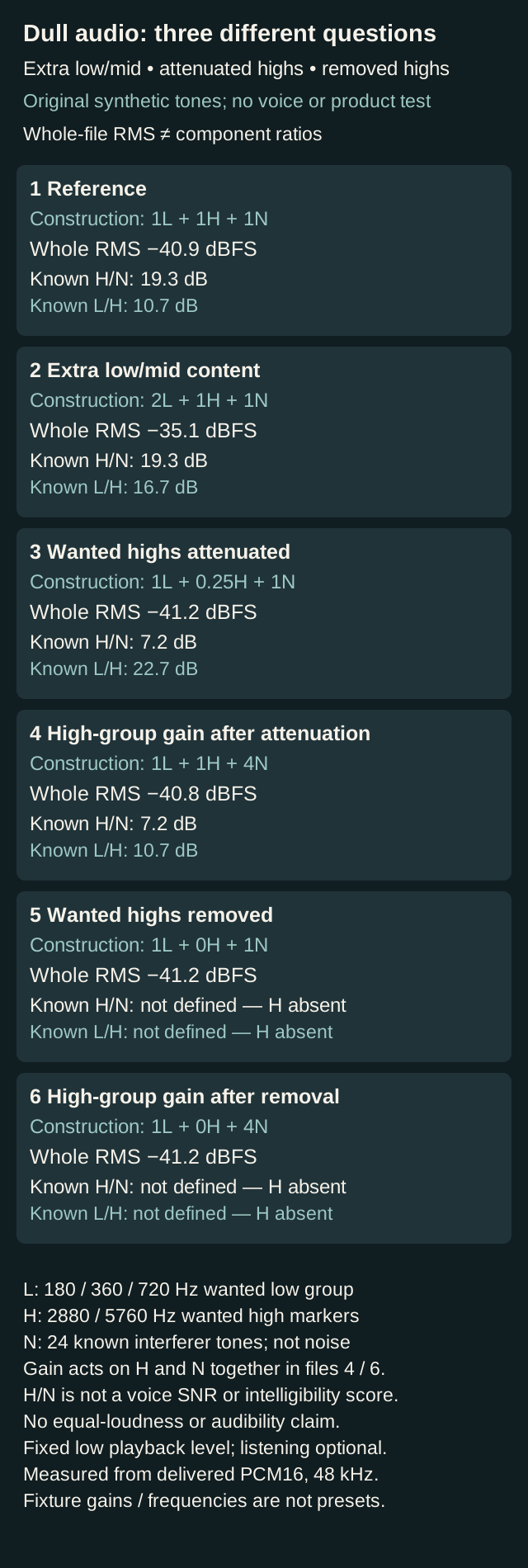
Six original tonal constructions distinguish extra low-mid content, attenuated wanted highs and removed highs. Decoded whole-file RMS and known low/high and wanted-high/interferer ratios are reported separately. Gain restores attenuated markers while raising interference; gain after removal does not recreate absent markers. No voice, software, audibility or equal-loudness test.
Keep one fixed low playback volume between files. Equal loudness is not claimed. Whole-file RMS and the central known high-group wanted/interferer ratio are different measures. The ratio is not a voice SNR or intelligibility score. Frequencies and gains are fixture choices, not presets.
1 Reference
Whole-file RMS −40.9 dBFS; central known L/H 10.7 dB. Known high-group H/N ratio (central 1–7 s): 19.3 dB.
Download muffled-reference.wav · WAV (48 kHz, 16-bit PCM; mono) · 8 seconds · 768,044 bytes
File integrity
SHA-256: 42af01e913482118ef1e7317586f9b010fd6ab0f65ecc249cf45af37eb6f7414
2 Extra low/mid content
Whole-file RMS −35.1 dBFS; central known L/H 16.7 dB. Known high-group H/N ratio (central 1–7 s): 19.3 dB.
Download muffled-low-excess.wav · WAV (48 kHz, 16-bit PCM; mono) · 8 seconds · 768,044 bytes
File integrity
SHA-256: 9ef0ae420ff85666ebac77a2791a2c3775204666ea8b423644f73d087444a657
3 Wanted highs attenuated
Whole-file RMS −41.2 dBFS; central known L/H 22.7 dB. Known high-group H/N ratio (central 1–7 s): 7.2 dB.
Download muffled-high-attenuated.wav · WAV (48 kHz, 16-bit PCM; mono) · 8 seconds · 768,044 bytes
File integrity
SHA-256: 65d09b3ecadb1453ab8a3794e18e34f015d6729ade70acd487f3367a0c0e2116
4 High-group gain after attenuation
Whole-file RMS −40.8 dBFS; central known L/H 10.7 dB. Known high-group H/N ratio (central 1–7 s): 7.2 dB.
Download muffled-high-gain.wav · WAV (48 kHz, 16-bit PCM; mono) · 8 seconds · 768,044 bytes
File integrity
SHA-256: 3fabc801007986962b58096fdb6f37580082e0de5fd69e45618a6ac58b64f1c7
5 Wanted highs removed
Whole-file RMS −41.2 dBFS; central known L/H not defined, H absent. Known high-group H/N ratio (central 1–7 s): not defined; wanted markers below −90 dBFS display floor.
Download muffled-high-removed.wav · WAV (48 kHz, 16-bit PCM; mono) · 8 seconds · 768,044 bytes
File integrity
SHA-256: 311875e8dd90a84867b54623287da3457db4754614498c622dfc38c8dad382b5
6 High-group gain after removal
Whole-file RMS −41.2 dBFS; central known L/H not defined, H absent. Known high-group H/N ratio (central 1–7 s): not defined; wanted markers below −90 dBFS display floor.
Download muffled-gain-after-removal.wav · WAV (48 kHz, 16-bit PCM; mono) · 8 seconds · 768,044 bytes
File integrity
SHA-256: 4b63ef6d9a3de3fa97f2cda078a73039af7da54b3cd135a4fcdbcd20136818c9
Generated and measured by StudioSignalLab on November 2, 2026. Shipped files are pinned by hash. These examples contain no speech, music or hardware capture. Method fixed and independently reviewed before generation. Two decoders agree on every sample; two fresh generations are byte-identical; separately structured reconstruction, analytic projections, Goertzel and Decimal RMS checks are retained. Known tonal groups and arithmetic gains, not speech, a microphone response, an actual EQ/crossover, denoiser or AI software test.
What the delivered measurements establish
Decoded whole-file RMS values are 1: −40.9, 2: −35.1, 3: −41.2, 4: −40.8, 5: −41.2, 6: −41.2 dBFS. Measured central L/H is 10.7 dB in the reference and 16.7 dB with extra low/mid content. That ratio distinguishes the tonal balance from a simple whole-file level change. In the central window, the known wanted-high/interferer ratio is 19.3 dB in the reference. It falls to 7.2 dB after wanted-high attenuation and remains 7.2 dB after high-group gain. Restoring the wanted amplitudes has also raised the interferer. In files 5 and 6 the wanted high markers are below the −90 dBFS display floor, so no ratio is presented.
The high-group ratio measures only our two wanted tones against our 24 known interferer tones in the central 1–7 second window. It is not a voice signal-to-noise measurement, a full-band energy ratio, an intelligibility score or proof that one file sounds better. Whole-file RMS and individual-component amplitudes are different measures. Equal perceived loudness is not established.
Partial attenuation can be countered arithmetically here, but that does not improve the wanted-to-interferer ratio in the affected group. When the wanted components are absent, linear gain cannot bring those original components back. Generative software may synthesize replacement content; our linear demonstration neither tests nor rules out that different process.
For reproduction, L has component amplitudes 0.010, 0.006 and 0.004; H has 0.003 and 0.002. Interferer tone k has amplitude 0.00008, frequency 3120 + 160k Hz and phase πk(k−1)/24 for k = 0…23. Files construct L+H+N, 2L+H+N, L+H/4+N, L+H+4N, L+N and L+4N. Each eight-second file has 384000 mono frames at 48 kHz; first/last 2400 frames use raised-cosine fades with endpoint divisor 2399. Quantization rounds once to nearest-even integer after multiplication by 32767; measurements decode using denominator 32768. There is no dither or normalization. Two parsers agree on all PCM samples, two fresh regenerations are byte-identical, and a separately structured reconstruction agrees exactly on every sample. All 174 coherent amplitude checks meet the predeclared 0.1/32768 amplitude bound; independent Goertzel and 50-digit RMS checks agree. Ratios are rounded to one decimal; ideal-coefficient predictions differ from decoded measurements by a few thousandths of a decibel. Known groups are measured over 1–7 seconds, not estimated by an installed editor.
Choose software for the problem you actually found
A useful tool decision starts with the saved phrase and a clear acceptance check. Keep both the problem words and an unaffected phrase in the comparison. The routes below are documented capabilities, not a ranking from our synthetic files. We did not run these products for this article.
- Ordinary tonal imbalance, with useful content still present: start with EQ in an editor you already have. A paid restoration suite is not needed merely to try a small tonal adjustment.
- Spoken dialogue plus noise or echo in an editing workflow: evaluate controlled enhancement on a copy, then check words and unaffected passages. This is a different task from simply lifting treble.
- Irreplaceable bandwidth-limited dialogue: compare the best original with a specialist resynthesis trial only if available under suitable terms. The required module and edition matter more than the brand name.
Start free: Audacity for a controlled EQ comparison
The Audacity 4 EQ and Filters manual (September 2, 2026) distinguishes low/high-pass filters and shelves, and describes lifting or cutting frequency ranges. Boosting uses headroom. On a copy, try one modest change based on the actual passage, compare the entire phrase, and inspect the resulting peak level before export. An available documented spectrum display can help compare the same selection; it does not supply an automatic “correct voice” curve.
Check the installed version and matching manual before relying on an analyzer. On November 2 the download page lists Audacity 4.0.1, while the Analyze manual still labels Plot Spectrum unimplemented in the 4 alpha. The separate Development Manual describes an FFT plot, but that does not verify its availability in your build. Use only controls actually available to you; the coherent measurements here are our own calculations, not Audacity output.
If the result is muddy because one region dominates, compare a restrained cut there with a restrained lift elsewhere. Keep the original available and do not copy the fixture’s frequencies or fourfold gain as presets. Accept a change only if it helps the troublesome phrase without damaging an unaffected one.
The Audacity 4 Noise Reduction manual (October 29, 2026) describes the following check: use a suitable noise-only profile, then audition what is being removed with its Noise-only option. Wanted sound in the profile can be treated as noise. If useful content is being removed or the result becomes watery, reduce or undo that processing before adding EQ. This profile-based effect is documented for steady background noise, not every disturbance.
Descript: assess dialogue enhancement within the editing workflow
If you already need transcript-based dialogue editing and the recording also contains noise or echo, Descript is a workflow candidate. Its Studio Sound documentation describes a file-level effect, an Intensity slider, internet access and AI Credits on current plans; legacy plans differ. Applying it to a file affects its instances across the project. Check the scope before experimenting in a shared edit.
Use a duplicate working file or safe project copy, preserve the original and compare a lower intensity with bypass. Descript documents reducing intensity or disabling Studio Sound for the affected file when speech is suppressed. Check complete words and a reopened export, rather than judging only the quiet pauses.
Decision point: evaluate Descript if dialogue editing plus controlled enhancement solves work you actually do. Before choosing a plan, check the current included credits, usage rules and export needs against one representative recording. A subscription is not justified by a dull sound alone. Our existing Descript guide is linked below; these examples do not demonstrate its performance.
RX Advanced: specialist resynthesis for a narrower case
For valuable dialogue with missing bandwidth, iZotope’s current product page describes RX 12 Advanced and places Spectral Recovery in Advanced. It describes resynthesized upper-frequency content and the ability to add missing lower frequencies. Do not assume a cheaper edition includes this module, or that an older RX 11 comparison page is the current buying specification.
That is a different operation from EQ gain. Added plausible content is not evidence that the original lost waveform, exact consonants or recording fidelity has been recovered. Audition the actual speaker and verify words against the source; our six tonal files are not a test of RX.
Decision point: consider the exact Advanced edition only if an available trial or documented evaluation route improves your own irreplaceable sample enough to justify specialist repair. Check current OS/host compatibility, trial and export restrictions, license terms and required module before purchase. For a simple tonal adjustment or a take you can easily record again, start with the existing editor or a better new capture.
Run a small acceptance test before paying or committing the edit
- Choose one difficult phrase and one representative unaffected phrase. State the goal in observable terms, such as retaining complete words while reducing a specific unwanted change.
- Compare original and processed versions at sensible similar listening levels where practical. Do not let a louder preview be the only reason you prefer one. Keep peaks below overload without assuming a low final meter clears earlier damage.
- Listen for newly changed consonants, pumping, watery tails and a tonal change between phrases. Note tradeoffs rather than treating more enhancement as success.
- Reopen a short export and verify the same words, channels and processing. Confirm that the software plan and license support the actual intended output.
- If there is no clear improvement, keep the original and stop adding processors. A new capture or a source-side correction may be more useful than another purchase.
Keep the repair and the buying decision connected
Record the earliest changed stage, the one setting you changed, the remaining limitation and the reopened-export result. That note makes a later software choice explainable. “More detail” on a vendor page is a reason to investigate a capability, not proof that it solves this recording.
Use the related Descript and audio-cleanup guides for broader workflow comparisons. If the main problem is gain variation, harsh consonants or mono cancellation, follow the corresponding guide instead of repeatedly processing this file as a tonal problem.
Sources and verification
Claims were checked against the following first-party documentation on November 2, 2026. Product capabilities can change; verify current documentation before buying or changing a production system.
- Sennheiser MK 4/MK 8 — model-specific muffled-sound troubleshooting (v2.2, February 2026)
- Audacity Manual — EQ and Filters
- Audacity Manual — Noise Reduction, profiling and artifacts
- Descript Help — Studio Sound, file scope, intensity and current-plan AI Credits
- iZotope RX 12 Advanced — Spectral Recovery and edition inclusion
- Audacity download — current version listed on the day of research
- Audacity Analyze manual — alpha-era Plot Spectrum availability caveat
- Audacity Development Manual — Plot Spectrum (documentation, not installed-build verification)
- Descript pricing — current AI-credit and plan definitions; no allowances or prices reproduced
- RX 12 user guide — Spectral Recovery, ADV module and synthesized signals
Frequently asked questions
Does a muffled recording prove my microphone is broken?
No. Check the selected input and exact-model orientation, then compare saved source, project, export and playback. The first observed change narrows the investigation; our synthetic tones do not diagnose hardware.
Should I add treble to every dull recording?
First distinguish tonal imbalance, attenuated content and processing artifacts. A lift can also raise unwanted content, and linear gain cannot recreate original components that are absent. Compare one restrained change on a copy.
Why does my voice sound underwater after cleanup?
Compare the untouched file with the suspected processing stage. Audacity documents watery or metallic artifacts when Noise Reduction is excessive. That is one documented possibility, not a diagnosis of every watery recording or every application.
Can AI restore missing frequencies exactly?
A resynthesis tool can add plausible content, which differs from proving recovery of the exact original waveform. Verify the real words and tradeoffs on your own sample. Our linear-gain examples do not test an AI model.
Do I need paid software?
Not merely to investigate tonal balance. Start with an existing or free editor. Consider a paid workflow or specialist repair only when an appropriate evaluation on your own sample solves a concrete need and the edition, license and export terms fit.
Are the downloadable examples microphone or software tests?
No. They are six original eight-second synthetic tonal constructions with known components, gains and removal. They measure arithmetic effects, not speech intelligibility, microphone response, a real equalizer or a vendor algorithm.