Tutorial · Research edition
Audio Disappears in Mono? Find Phase Cancellation Before Export
Hear what survives stereo-to-mono conversion with eight original WAV examples. Diagnose polarity, channel delay and missing content before changing the mix.
The voice is present in the stereo file, but becomes thin or disappears when you switch to mono. Before raising its level, listen to the left channel on its own, the right channel on its own and their mono combination. If the wanted sound is in both channels separately but is lost in the combination, their relationship is the next thing to investigate. Cancellation is one possible cause; the checks below help distinguish it from missing channels or a playback-path fault.
Focusrite’s mono/stereo guide explains why a mono microphone recorded into a stereo track can occupy one side. If that is your symptom, use the Scarlett one-ear guide below. Two populated channels can subtract when combined. Our downloadable examples make the difference audible and visible, then show why a polarity button or a one-channel export is a test to justify rather than a repair to apply blindly.
Run the three-way listening check
- Duplicate the source or project and save its current routing. Stop live capture and audition a short saved passage containing the wanted sound. Keep playback low and fixed throughout the comparison.
- At the same low playback level, listen to the left channel alone, then the right alone. Record whether each contains the wanted sound. Do not interpret an empty channel as cancellation.
- Make or monitor a mono sum of those same two channels with equal contribution and no added processing. Note the application’s downmix gains. Compare the same passage, not a different take or a loudness-normalized copy.
- If a channel is empty, follow the one-ear/input-assignment guide below. If both contain the sound but the mono sum loses it, continue here. If the file survives the sum but a connected speaker loses it, investigate the playback or cable path separately.
A meter moving in both channels proves neither correct content nor mono compatibility. Also, do not assume that every phone, speaker or platform plays everything in mono. Test the actual destination and preserve the original file.
Understand the sum before changing the polarity
For our experiment, mono M equals (L + R) / 2, calculated sample by sample. The division by two keeps two identical channels at the original channel level. Other downmix gains change the level comparison, so do not treat our measured decibels as every editor’s default.
If R is exactly the negative of L at the same sample positions and gain, their sum is zero. Audacity’s Invert documentation describes this cancellation when an inverted copy is mixed with matching uninverted audio. Reversing polarity is multiplication by −1; it is not shifting the waveform in time.
A delay gives different phase relationships at different frequencies. For two equal copies separated by 0.5 ms, the ideal equal-weight sum cancels 1 kHz but retains 2 kHz at the reference amplitude. Our delivered integer files closely reproduce that result. A global polarity flip can move the cancellations rather than fix a timing mismatch.
Our measured example: four mono outcomes
All examples are four seconds long at 48 kHz, 16-bit PCM. The reference s combines 250 Hz, 1 kHz and 2 kHz tones with short fades. A separate component u is a 1.5 kHz tone. “Independent” here means absent from L and at a different frequency from the three reference tones, not statistical independence. These are synthetic signals, not speech, music, a room recording or a test of intelligibility. We used no loudness normalization.
Control: L = s and R = s. The mono render is sample-for-sample identical to either source channel. Its whole-file RMS is −30.86 dBFS. That is an amplitude measurement, not LUFS.
Opposite polarity: L = s and R = −s. Each channel retains the reference on its own; every stored sample in the mono render is zero. This is a literal digital null, not a threshold chosen to declare a sound inaudible.
Delay: L = s; R is s delayed by 24 samples, or 0.5 ms. In the stable 1–3 second interval, the mono 1 kHz component is 81.57 dB below the control’s 1 kHz component. The 2 kHz change is less than 0.01 dB. The result is frequency-selective cancellation, not total silence; the tiny residual depends on the delivered PCM rounding.
Independent content: L = s and R = −s + u. The common reference cancels, while u remains in mono at half its right-channel amplitude, approximately 6.02 dB lower. Keeping only L would discard u entirely. In a real project, the independent material could be something the audience needs, so check it before selecting a channel.
The stereo fixtures are rounded to integer PCM first; each mono sample is then the rounded arithmetic mean of its two stored samples, with ties rounded to the nearest even integer and no dither. We independently parsed the RIFF data and recomputed every mean. All eight files have zero clipped samples and peak below −21.75 dBFS; the opposite-polarity mono file is silent. The equations explain these fixtures, not an unknown recording’s cause.
Original synthetic demonstration
Compare the stereo source with its mono sum
Turn playback volume down first. Synthetic tones; no speech or microphone recording. No loudness normalization. All peaks below −21.75 dBFS. The opposite-polarity mono file is intentionally silent: do not increase volume. Listening is optional.
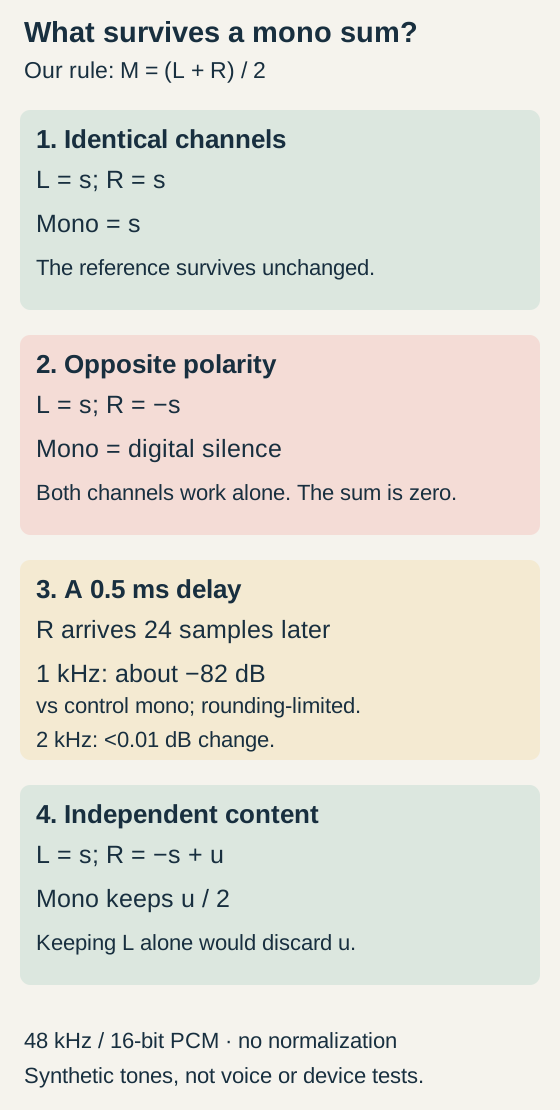
Four measured synthetic mono-sum examples: identical channels survive, opposite samples cancel to zero, a 0.5 ms delay reduces 1 kHz but preserves 2 kHz, and independent right-channel content survives the sum but would be lost by keeping only left.
Download each stereo/mono pair and align it at the same start in an editor. Audition left, right and mono separately at fixed low gain. Use 1–3 seconds for the spectral comparison. The descriptions and diagram explain the results without listening.
1a. Control: identical stereo channels
4 seconds. L and R carry the same reference. Audition either channel alone.
Download mono-control-stereo.wav · WAV (48 kHz, 16-bit PCM; stereo) · 4 seconds · 768,044 bytes
File integrity
SHA-256: f88c8c910b2801eda510ff1d3268695cc64d5621f0b4338ef9a4aef6908092b4
1b. Control: mono sum
4 seconds. The arithmetic mean is identical to either stored source channel.
Download mono-control-fold.wav · WAV (48 kHz, 16-bit PCM; mono) · 4 seconds · 384,044 bytes
File integrity
SHA-256: f282a7415117d19a620788b9b362705b54755f0cf8bbf858f7e6e64d26ff0138
2a. Opposite-polarity stereo
4 seconds. Both channels contain the reference on their own; right is the exact negative of left.
Download mono-opposite-stereo.wav · WAV (48 kHz, 16-bit PCM; stereo) · 4 seconds · 768,044 bytes
File integrity
SHA-256: d146168128dd92559abcd3f678b9705b18826160cd47b8ca2d8057c0339e6e66
2b. Opposite-polarity mono: intentional silence
4 seconds. All stored samples are zero. Do not turn up playback volume. Inspect the flat waveform instead.
Download mono-opposite-fold.wav · WAV (48 kHz, 16-bit PCM; mono) · 4 seconds · 384,044 bytes
File integrity
SHA-256: a9e449b8270343d0c9339c600295ad669fde65d5b3a967649e6d7df7c5034528
3a. Stereo with 0.5 ms channel delay
4 seconds. The right channel is delayed by 24 samples at 48 kHz.
Download mono-delay-stereo.wav · WAV (48 kHz, 16-bit PCM; stereo) · 4 seconds · 768,044 bytes
File integrity
SHA-256: 6b09772a844fffc37d76fed8c1fd773a2e86cd1cd03003fcee2e43b5276501de
3b. Delayed-channel mono sum
4 seconds. In the 1–3 s measurement window, 1 kHz falls by 81.57 dB; 2 kHz changes by less than 0.01 dB.
Download mono-delay-fold.wav · WAV (48 kHz, 16-bit PCM; mono) · 4 seconds · 384,044 bytes
File integrity
SHA-256: b1de2689748e6939ec5507303d3f6ac755a43575257f996875bee66204387b84
4a. Stereo with independent right-channel content
4 seconds. L = s; R = −s + u. The 1.5 kHz component u exists in the right channel, not the left.
Download mono-independent-stereo.wav · WAV (48 kHz, 16-bit PCM; stereo) · 4 seconds · 768,044 bytes
File integrity
SHA-256: 880c92da0c58ee01091381a9b9824c6ce69dfdfddbd91af84e1159cb187485e7
4b. Mono retaining independent content
4 seconds. The common reference cancels; u remains at half its right-channel amplitude. Keeping only L would lose u.
Download mono-independent-fold.wav · WAV (48 kHz, 16-bit PCM; mono) · 4 seconds · 384,044 bytes
File integrity
SHA-256: 2e7d775b2b953a7ca91058f95bbd0e449832db8c86d3c9dc7dc97ba25988de66
Generated and measured by StudioSignalLab on October 31, 2026. Shipped files are pinned by hash. These examples contain no speech, music or hardware capture. Original synthetic signal arithmetic, not speech, an installed application, a cable or a hardware test. Mono here is (L + R) / 2; other downmix coefficients can change levels.
Use the examples without making silence a volume test
Import a stereo fixture and its matching mono render at the same start time in an editor. Keep other tracks muted and processing bypassed. Inspect both source channels and the mono waveform; the opposite-polarity mono file should remain a flat line. Its silence is intentional. Do not raise playback gain to search for a missing tone.
Compare the delay and control files over 1–3 seconds, where the fades and edge effects are excluded. A spectrum view should show a much smaller 1 kHz component in the delayed mono render while the 2 kHz component remains. Use matching analysis settings. Our numeric result uses a coherent two-second Fourier measurement of the stored samples, not a screenshot cursor estimate.
The independent-content fixture is a counterexample to “just keep the left channel.” Listen or inspect for its 1.5 kHz component in the right channel and in the mono render, then compare left alone. These are separate diagnostic observations. You do not need to listen to the tones to use the diagram and measured descriptions.
Locate the first stage that loses the sound
Repeat the left/right/mono check at the earliest available source, the edited mix and the exported file. Keep the passage and contribution gains comparable. If the source already cancels, investigate its recording or stereo processing. If only the mix fails, inspect changes between those stages. If the mix survives but the export fails, compare the export’s channel mapping, mix settings and actual file.
Bypass a suspected stereo-widening effect or duplicated, delayed layer one at a time on a copy. Re-export the same passage and retain a before/after pair. This is an experiment to locate a change, not proof that every widening effect causes cancellation or that every duplicate is unwanted.
When only one part disappears, note what remains. Different instruments or voices can have different channel relationships. An all-file loudness reading can obscure the loss of the important part. Judge the actual wanted content and the same time interval, not a louder surviving background.
Keep the cable diagnosis separate
HARMAN documents another way centered content can disappear in its JBL self-powered speaker example: a stereo TRS output fed into the speaker’s balanced mono input. The connectors can look compatible while carrying different signals. HARMAN labels the tip as plus and the ring as minus; in that documented path the receiver responds to their difference, so shared left/right content can be rejected. This is not the ordinary L + R mono sum used in our files.
If the saved file passes a proper mono-sum check but the connected speaker path loses the voice, verify the exact output, input and manufacturer-supported connection. Do not assume that a TRS plug always means stereo. Do not join the left and right outputs together with a homemade adapter or change wiring by guesswork. HARMAN’s supported examples separate the stereo channels for the appropriate inputs; follow the manuals for your actual equipment. Our fixtures do not test a cable, electrical input or speaker.
Choose a correction that preserves the wanted material
If a verified duplicate was stored with opposite polarity, an audition with one channel inverted can demonstrate the relationship. Keep the original, undo the experiment and decide where that inversion belongs in the source or routing. It is not a rule to invert every right channel.
If timing or stereo processing causes the loss, test the relevant alignment or processing change, then listen again in stereo and mono. One fixed offset is not a general remedy for changing delays, reflections or unrelated microphones. Use the audiovisual sync guide only when the problem is sound against picture; that is a different comparison.
Using one channel may be an acceptable deliberate mono source when it contains everything needed. Establish that first. Independent voices, instruments or ambience in the other channel must not be silently removed. In our fourth fixture, a left-only “fix” loses u even though the three reference tones return.
If the only remaining file is the already summed silent or damaged mono version, polarity inversion cannot reconstruct the cancelled source from it. Return to the original stereo file, isolated tracks or backup. Preserve editable projects as well as exports; Audacity’s mixing documentation warns that original components cannot generally be separated again after a mixdown.
Accept the fix only after the export survives
- Save the original stereo file, a note of the failing passage and the exact left/right/mono observations.
- Document one justified change and retain a matched before/after export. Avoid changing gain, polarity, timing and processing together.
- Check each wanted source in stereo and in an equal-contribution mono sum at a consistent listening level. Confirm that the correction did not merely replace one missing component with another.
- Reopen the final exported file and repeat the check. Test the actual playback connection separately where relevant; a good timeline is not proof of a correct file or cable path.
- Keep the source and the correction reversible. Record what the evidence supports: which passage survived which downmix and which destination—not a claim that every device or mix will behave identically.
Sources and verification
Claims were checked against the following first-party documentation on October 31, 2026. Product capabilities can change; verify current documentation before buying or changing a production system.
Frequently asked questions
Why does my voice disappear when I convert stereo to mono?
If the voice is present in both channels alone but disappears when they are combined, cancellation is one possibility. Compare left, right and an equal-contribution mono sum on a copy. Check the source, processing and export in order; an empty channel or a faulty playback connection is a different diagnosis.
Is inverting polarity the same as delaying audio?
No. Polarity inversion changes each sample’s sign. A delay moves samples in time, producing different phase relationships at different frequencies. A global polarity flip is not a general cure for timing-related cancellation.
Can I fix the problem by keeping only the left channel?
Only if that channel contains all the wanted material and the deliberate mono result passes your checks. Our independent-content example shows a component that is absent from the left channel but remains in the right and in the mono sum.
Does every phone play audio in mono?
Do not assume so. Playback behavior depends on the device, settings and path. Test the actual destination separately from a controlled mono-sum check.
Why is the opposite-polarity mono demonstration silent?
Its left and right stored samples are exact opposites, so their arithmetic mean is zero for every sample. This is intentional digital silence. Do not raise playback volume; inspect the flat waveform or use the diagram.