Tutorial · Research edition
Microphone Volume Goes Up and Down? Find the Changing Stage
Trace changing microphone levels through capture, apps and exports. Six original measured WAVs separate imposed gain, compression, makeup gain and ducking.
If your microphone gets louder and quieter, first find where the change enters the chain. Changes in speaking effort, distance or angle can already be present in the source; use our microphone-technique guide for placement. Automatic adjustment, a compressor recovering after a louder sound and another source triggering ducking can leave superficially similar clues. Turning up the final fader can make another passage too loud.
Keep the original and compare one passage through the saved source, project, export and call or monitoring route. Our six original downloadable examples make known gain changes visible and measurable. They help explain what to test next; a resemblance to one of them cannot identify the cause of a real recording problem.
Start with a controlled comparison, not a louder fader
- Save an untouched source and make a working copy. Note the microphone, connection, input and output, application, enabled processing and the exact passage where the change occurs. Leave unknown fields unknown.
- Compare the same saved source in another player at a fixed low playback level, using a known working output route if available. A change that follows the file belongs in the captured or earlier processed material; a change confined to one listening route needs a different investigation. A playback comparison alone cannot establish the hardware cause.
- Compare that source with the project, a short reopened export and the call or stream recording if you have one. Note the earliest observable difference. A microphone meter, a mix meter, an export and the remote listener’s recording are different observation points.
- For a new short test, keep microphone position and speaking effort reasonably consistent and note any changes. Then compare one reversible processing change at a time, on a duplicate or a test session. Do not alter a real interview or live broadcast just to run this experiment.
Use the observation to choose the next test
These observations narrow a test; none proves a single cause.
- The untouched source changes in another player too — Capture settings, microphone position and any device/app processing before that saved source. Later faders cannot recover missing information.
- The source is steady but the project or export changes — Track/clip automation, compressor gain reduction, output gain and bus processing. Bypass one stage in a duplicate and match the passage.
- Only the call/stream copy changes — The selected call input, application automatic level controls and processing in that delivery path. Keep echo protection appropriate to the call.
- The level falls when a different source becomes active — Check actual sidechain/ducking routing and its trigger meter. Coincidence in a mixed recording is not proof.
- Only pauses get quiet or word beginnings disappear — Check a gate or suppression stage using the separate Noise Gate guide; that is a different primary fault.
Find automatic level controls in the path you actually use
Zoom’s current desktop-app settings documentation includes “Automatically adjust microphone volume” under Microphone. It says the input-volume slider is unavailable while automatic adjustment is enabled and suggests considering disabling it when audio fades in and out. Treat that as a scoped comparison in your own available client settings, not proof that Zoom caused a saved recording to change. If you test manual level, use a short test call and check both normal and louder speech before relying on it.
Do not confuse automatic input level with noise suppression or echo cancellation. Those controls have other purposes. Leave required call protections in place and avoid a blanket “turn everything off” recipe. Controls and availability can vary with the platform, version or account policy.
The Shure MV7+ guide describes Auto Level as adjusting gain in the moment and provides a Manual Mode. Its scope matters: the guide says its software settings do not affect XLR audio. A device-side USB setting therefore cannot be assumed to control an interface recording made from its XLR output. Verify your own model and connection before looking for an equivalent switch. No MV7+ was tested for this article.
Separate compression from fixed gain and ducking
OBS documents a compressor as reducing peaks above a threshold. Ratio and threshold shape how strongly it responds; attack and release govern its response over time, and output gain raises the processed source. A level that stays reduced after a louder passage can be a useful reason to inspect an enabled compressor, but the saved waveform alone does not prove that one is present. The documentation page is dated January 12, 2022; it is not evidence of the defaults in an installed current version.
OBS also documents sidechain ducking: another source, such as the microphone, can reduce a selected source such as desktop audio. If your microphone itself becomes quiet, inspect what is actually processing that microphone and which source is selected as the trigger. Do not copy a desktop-music ducking setup onto the microphone without a routing reason. The documented example ducks Desktop from Microphone. Applying that control in another direction is a routing inference to verify in your setup, not a tested microphone-fading example.
Audacity’s compressor guidance describes reducing dynamic range and raising the result with makeup gain or later normalization. Those are separate operations. Adding fixed gain to an already changing recording raises the remaining background as well as the wanted material; it does not undo the time-varying gain history. Our fifth file makes that arithmetic explicit without claiming to reproduce an Audacity effect.
Our measured example: six files with known gain changes
All six files use the same eight-second, 48 kHz mono synthetic source. A 220 Hz tone with a smaller 660 Hz component forms nine shaped bursts: several ordinary bursts, two three-times-amplitude accents and two half-amplitude bursts shortly after those accents. A separate continuous 1 kHz tone is a deliberately low-level background measurement marker. It is not a room-noise recording or a model of speech.
File 1 is the reference. File 2 follows a schedule chosen in advance: gain falls from 1 to 0.5 over 20 ms at two seconds, stays there until four seconds, then returns over 20 ms. It has no detector or feedback. We call it imposed gain, not an AGC algorithm. Both the foreground and marker pass through that known gain.
Files 3 and 4 use our educational peak-envelope compressor. Its detector has a 6 ms rising time constant and either 60 ms or 600 ms falling time constant. The threshold is −38 dB relative to floating full scale and the ratio is 4:1. Gain is computed from that detector at each sample. There is no lookahead, knee or extra gain smoothing. These choices illustrate one model; they are not the implementation, defaults or recommended settings of OBS, Audacity, Zoom or Shure.
File 5 doubles every delivered PCM integer of file 3 exactly. File 6 uses an inaudible separate trigger active at 1.1–1.6, 3.2–3.7 and 6.0–6.5 seconds. Its target gain is 0.25 while triggered and 1 otherwise, with 100 ms falling and 600 ms recovering gain time constants. The trigger is not mixed into the WAV. This is a separate educational gain rule, not OBS’s ducking algorithm.
Each burst has 10 ms half-cosine edges. After processing, a 50 ms fade is applied to each end. Files 1–4 and 6 are rounded once to PCM16 using nearest-even rounding with a 32767 multiplier; file 5 is exact integer doubling. There is no dither or normalization. All output levels below come from decoding the delivered PCM using a 32768 full-scale denominator. The timing and gain trace are construction metadata, not a detector reverse-engineered from a recording.
Original synthetic demonstration
Compare known gain changes at one fixed low playback level
Turn playback volume down first. Synthetic tones only; no speech or music. The highest delivered peak is approximately −20.97 dBFS. Do not increase volume to hear the low-level background marker; its audibility is not claimed. Listening is optional.
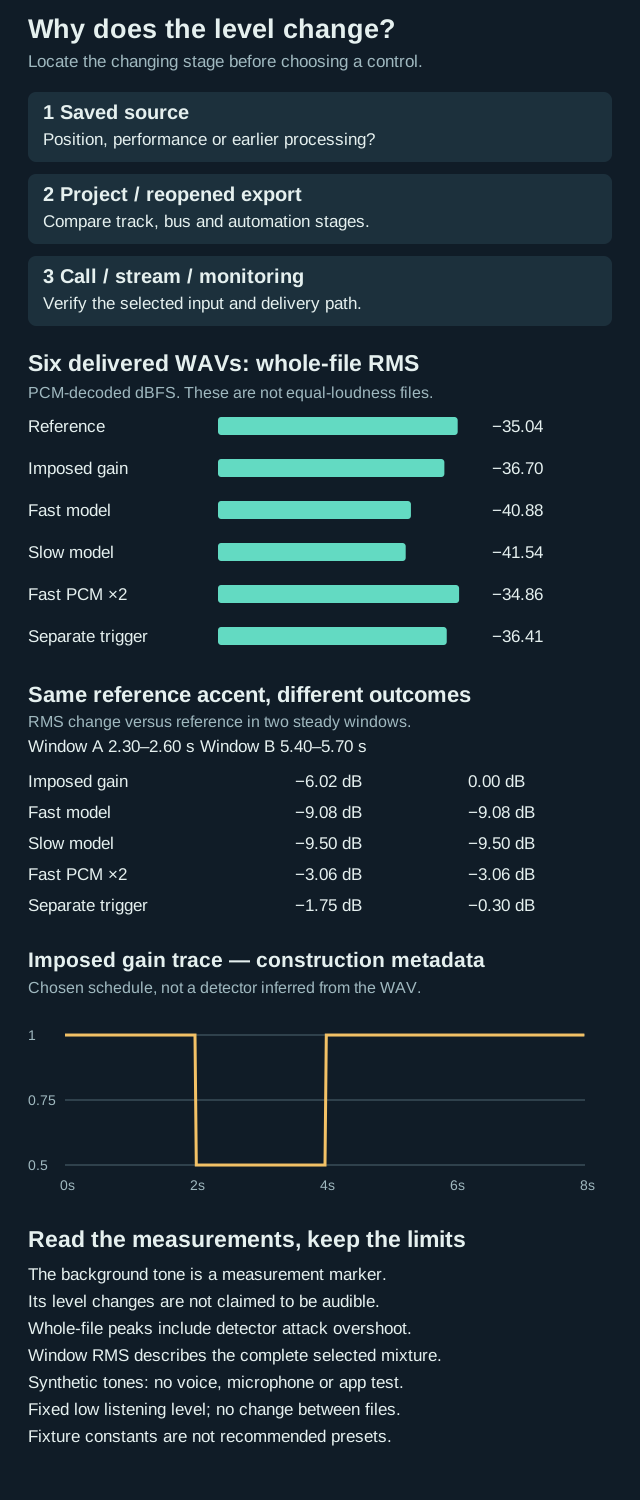
Original synthetic level investigation: find the changing stage; compare six whole-file RMS levels and changes in two identical reference accent passages. An imposed gain trace is explicitly labelled construction metadata. Marker audibility and equal loudness are not claimed.
Keep one fixed low playback volume without changing it between files. Equal loudness is not claimed. Whole-file RMS and three steady foreground-window RMS levels appear beside each download, in dBFS; each foreground window measures the complete mixture. Whole-file peaks include detector attack overshoot. The full ten-window ledger is below. Fixture time constants and threshold/ratio are not recommended presets.
1. Unprocessed synthetic reference
Shaped tonal foreground plus a low-level 1 kHz measurement marker. Whole-file RMS −35.04 dBFS. Steady-window RMS: accent A (2.30–2.60 s) −27.07; accent B (5.40–5.70 s) −27.07; normal (4.60–4.90 s) −36.61 dBFS.
Download volume-reference.wav · WAV (48 kHz, 16-bit PCM; mono) · 8 seconds · 768,044 bytes
File integrity
SHA-256: 5fac1ff8be5d5e3ba829c4823f64309727be1b03da0d9760d3981b49d672e67e
2. Imposed gain schedule
Known gain falls to 0.5 between two and four seconds; no AGC detector. Whole-file RMS −36.70 dBFS. Steady-window RMS: accent A (2.30–2.60 s) −33.09; accent B (5.40–5.70 s) −27.07; normal (4.60–4.90 s) −36.61 dBFS.
Download volume-controlled-gain.wav · WAV (48 kHz, 16-bit PCM; mono) · 8 seconds · 768,044 bytes
File integrity
SHA-256: 13bc55f2bc9d3754f4c80fb1d06d1dd5933d161524068154d49db6dbc5f43775
3. Educational compressor: fast detector recovery
Own one-pole detector model with a 60 ms falling time constant, not an OBS preset. Whole-file RMS −40.88 dBFS. Steady-window RMS: accent A (2.30–2.60 s) −36.15; accent B (5.40–5.70 s) −36.15; normal (4.60–4.90 s) −38.55 dBFS.
Download volume-compressor-fast.wav · WAV (48 kHz, 16-bit PCM; mono) · 8 seconds · 768,044 bytes
File integrity
SHA-256: 5b0ba0780c1e57f41bf757954bc7a43ae0e1048e1f95becf6b7de48e8dba3638
4. Same model: slower detector recovery
Only the detector falling time constant changes to 600 ms; no voice-quality test. Whole-file RMS −41.54 dBFS. Steady-window RMS: accent A (2.30–2.60 s) −36.57; accent B (5.40–5.70 s) −36.57; normal (4.60–4.90 s) −39.07 dBFS.
Download volume-compressor-slow.wav · WAV (48 kHz, 16-bit PCM; mono) · 8 seconds · 768,044 bytes
File integrity
SHA-256: 5efd4a450b0dcccb39c1c189a3fec2595b7aa93d4f947c986803fa7bbf137251
5. Exactly twice every PCM integer in file 3
Raises every present component by 6.02 dB relative to file 3; does not undo changing gain. Whole-file RMS −34.86 dBFS. Steady-window RMS: accent A (2.30–2.60 s) −30.13; accent B (5.40–5.70 s) −30.13; normal (4.60–4.90 s) −32.53 dBFS.
Download volume-compressor-makeup.wav · WAV (48 kHz, 16-bit PCM; mono) · 8 seconds · 768,044 bytes
File integrity
SHA-256: 32950e8e1d22b1034b3303313b5c076015192438b2503a45d30f8c0c2f44e10b
6. Gain driven by a separate inaudible trigger
Known trigger intervals drive a different gain rule; not OBS ducking math. Whole-file RMS −36.41 dBFS. Steady-window RMS: accent A (2.30–2.60 s) −28.82; accent B (5.40–5.70 s) −27.38; normal (4.60–4.90 s) −37.82 dBFS.
Download volume-sidechain.wav · WAV (48 kHz, 16-bit PCM; mono) · 8 seconds · 768,044 bytes
File integrity
SHA-256: 0fd9804baee01e59e1af37c73c9eb2621d7b69d40fab11bf18108d38e8df4c65
Generated and measured by StudioSignalLab on November 1, 2026. Shipped files are pinned by hash. These examples contain no speech, music or hardware capture. Method fixed before first generation, with independent preliminary review conditions applied. Two shipped-byte decoders, two byte-identical regenerations and an independently structured reconstruction matching every PCM sample. These are our own arithmetic models, not installed OBS, Audacity, Zoom or Shure algorithms. The diagram gain trace is construction metadata; level figures are decoded PCM measurements.
Delivered measurements: levels and recovery windows
All figures below are measured from the delivered PCM. Whole-file RMS differs between files; equal loudness is not claimed. Keep one fixed low playback volume without changing it between files. Whole-file peak includes detector attack overshoot and is not the measure of gain reduction; use the named steady-window RMS comparisons.
- 1 Reference: whole-file RMS −35.04 dBFS; peak −25.00 dBFS.
- 2 Imposed gain: whole-file RMS −36.70 dBFS; peak −25.00 dBFS.
- 3 Fast model: whole-file RMS −40.88 dBFS; peak −26.99 dBFS.
- 4 Slow model: whole-file RMS −41.54 dBFS; peak −29.07 dBFS.
- 5 Fast PCM ×2: whole-file RMS −34.86 dBFS; peak −20.97 dBFS.
- 6 Separate trigger: whole-file RMS −36.41 dBFS; peak −25.21 dBFS.
The following ledger gives the reference window RMS in dBFS, then the RMS change in files 2 / 3 / 4 / 5 / 6, in dB. Foreground windows measure the complete mixture; marker-only windows have no foreground. Each interval starts inclusive and ends exclusive in the 48 kHz frame table.
- bed-baseline (0.10–0.40 s, bed-only): reference −63.05 dBFS; changes 0.00 / 0.00 / 0.00 / 6.02 / 0.00 dB.
- accent-1 (2.30–2.60 s, foreground-mixture): reference −27.07 dBFS; changes −6.02 / −9.08 / −9.50 / −3.06 / −1.75 dB.
- post-accent-bed (2.72–2.82 s, bed-only): reference −63.05 dBFS; changes −6.03 / −1.43 / −8.63 / 4.59 / −0.94 dB.
- quiet-1 (2.95–3.05 s, foreground-mixture): reference −42.60 dBFS; changes −6.02 / 0.00 / −6.49 / 6.02 / −0.65 dB.
- ducked-bed (3.25–3.45 s, bed-only): reference −63.05 dBFS; changes −6.03 / 0.00 / −3.16 / 6.02 / −7.00 dB.
- recovery-bed (4.20–4.40 s, bed-only): reference −63.05 dBFS; changes 0.00 / 0.00 / −0.41 / 6.02 / −2.75 dB.
- normal-burst (4.60–4.90 s, foreground-mixture): reference −36.61 dBFS; changes 0.00 / −1.95 / −2.47 / 4.07 / −1.22 dB.
- accent-2 (5.40–5.70 s, foreground-mixture): reference −27.07 dBFS; changes 0.00 / −9.08 / −9.50 / −3.06 / −0.30 dB.
- quiet-2 (5.97–6.07 s, foreground-mixture): reference −42.60 dBFS; changes 0.00 / 0.00 / −7.19 / 6.02 / −1.42 dB.
- late-bed (7.50–7.80 s, bed-only): reference −63.05 dBFS; changes 0.00 / 0.00 / −0.01 / 6.02 / −0.98 dB.
The two reference accents contain the same PCM passage. Imposed gain changes the first steady accent by −6.02 dB and the second by 0.00 dB; the fast compressor model changes both by −9.08 dB in these windows. After the first accent, the quiet mixture at 2.95–3.05 s is unchanged by the fast model but reduced by 6.49 dB by the slow model. This isolates the behaviour of our known construction, not an identification rule for real recordings.
File 5 is exactly twice all 384,000 delivered PCM integers of file 3, so every non-zero window gains 6.02 dB relative to file 3, including marker-only windows. Its whole-file RMS happens to lie near the reference, but its normal-burst window is 4.07 dB above the reference: a similar whole-file RMS does not mean matching passage levels or equal perceived loudness.
Read the background separately from the foreground
The marker-only windows let us measure what the gain rule does when the foreground is absent. The quiet foreground windows include both components, so their RMS values describe the whole mixture, not an isolated voice or a signal-to-noise ratio. A slow gain recovery after an accent can affect a later quiet burst in our model; that does not mean a shorter release is always the right repair. The marker is kept at a low level: these are measurements, and we do not claim its changes will be audible at the recommended low listening volume.
An actual voice, room and processing chain can behave differently. These tones do not establish intelligibility, voice quality, perceived equal loudness or a universal release setting. Listening is optional: compare the measured values and the known schedule first. If you listen, keep a fixed low playback level and do not turn up quiet tones to compensate.
Run one reversible test and keep the useful evidence
- Identify the exact control, the source it acts on and whether it is device-side, track-side, bus-side or call-side. Check the current primary documentation for that product and connection.
- In a duplicate or short test session, compare one change against the same passage. For a compressor, note threshold, ratio, attack/release, output gain and any gain-reduction display; for ducking, note the actual trigger source. Do not infer these settings from sound alone.
- For a newly recorded comparison, keep position and effort as consistent as practical and document the limits. If an available automatic level control is the candidate, compare it with a suitable manually checked level while preserving needed call protections. Restore the original setting if the test does not support the change.
- Reopen a short export or test-call copy and compare it with the saved source. Check both quiet and louder passages, background behaviour and any clipping. Keep the original and the setting record; a louder output by itself is not a successful repair.
Use a different guide when the symptom is different
This article covers changing level over time. Repeated words or a delayed duplicate belong in the OBS Echo guide; missing channel content when combined belongs in Audio Disappears in Mono. Audio that runs at the wrong speed or pitch needs the sample-rate guide. Sharp discontinuities belong in Crackling or Popping, and a steady narrowband tone belongs in Microphone Buzzing or Humming.
If the change is mainly caused by moving away from the microphone, start with consistent placement and the existing microphone-technique guide. Do not stack automatic gain, compression and a gate simply because each has a relevant name. Preserve the best source and establish which stage needs the change.
Sources and verification
Claims were checked against the following first-party documentation on November 1, 2026. Product capabilities can change; verify current documentation before buying or changing a production system.
Frequently asked questions
Does changing microphone volume prove automatic gain is enabled?
No. Position, captured performance, automation, compression, ducking or the listening path may produce different changes. Find the earliest affected stage and inspect the actual controls; a similar sound is not a diagnosis.
Why can the background seem to rise after a phrase?
Time-varying gain can change the level of background material along with wanted sound. Inspect enabled processing and compare the same passage. Our marker tone shows a known gain effect, not the cause of noise in a real recording.
Will makeup gain repair a compressor that reduces a later quiet passage?
Fixed makeup gain raises what is already present at that stage. It does not undo a time-varying gain history or recreate missing content. Our fifth file is exactly twice every PCM sample of the fast-compressor file.
Should I disable automatic microphone volume in every call?
No. Check the actual client and available controls, use a short controlled test and verify normal and louder speech. Keep needed echo protection. The appropriate choice depends on the source and call path.
Are the WAVs tests of a microphone or an application?
No. They are original numerical constructions with synthetic tones, known gain rules and decoded PCM measurements. They contain no recorded voice, microphone, room or installed-app processing.