Tutorial · Research edition
OBS Noise Gate Cutting Off Words? Keep Quiet Speech in the Recording
Find why an OBS noise gate cuts quiet words or sentence endings. Compare five original audio examples and calibrate thresholds, attack, hold and release.
A quiet first word disappears, the middle of the sentence is fine, then the last consonant gets chopped. Raising the microphone volume can make that less obvious without telling you what went wrong. First find out whether a filter is removing wanted audio, then distinguish a gate that opens too late from one that closes too soon.
A noise gate makes a level decision, not a language decision. It cannot know that a small signal is the end of a useful word rather than room noise. The useful setting is the one that keeps your quiet delivery in the saved recording—not the one that makes the meter perfectly still between sentences.
First prove that the missing audio is caused by a filter
Work in a local test, away from a live session. Save the current settings first. Record a short phrase at your normal distance, repeat it more quietly, then finish a sentence softly and leave a pause. Use headphones at a low level to play back the stopped recording on its own. Keep this file as the before reference.
Temporarily bypass only the Noise Gate filter on that microphone and repeat the same delivery. If the missing starts or endings return, the gate is a useful suspect. If they do not, restore it and test other processing one item at a time. Do not disable everything, adjust several controls and then assume the gate was responsible.
If cutouts remain with the relevant OBS filters bypassed, stop tuning their thresholds. Check another filter in the chain, including Noise Suppression, whose official guide warns that it can distort other sounds. Also check whether the source is muted or absent from the intended recording track. Double capture and audiovisual sync are different jobs; a gate cannot repair them. A file recorded after a syllable was removed does not contain that syllable for a later filter to recover.
Match the symptom to the next experiment
- A quiet phrase after a pause is missing, but a louder phrase opens the mic: lower the open threshold in small steps, keep other settings fixed, and repeat both phrases. A longer release cannot open a gate that never opened.
- The word begins but its first sound rises in late: once the opening threshold admits quiet speech, test a shorter attack. Judge the recorded consonant and any click or abruptness, not just the meter.
- The start is intact but the final sound is shortened: compare the close threshold first, then hold and release separately. A lower close threshold can keep quieter material above the closing decision; longer timing can carry the tail after that decision.
- The background pumps or the gate repeatedly opens and closes: compare quiet speech with the changing room level. A gap between opening and closing thresholds can reduce switching, but cannot create a separation that the input does not have.
These symptoms overlap. Make a change only when the new recording supports it, and restore the previous value when it does not help.
Find a usable gap between the room and your quiet voice
With the same input gain and microphone position, observe several seconds of ordinary room sound, including the fan or keyboard you actually expect. Then speak the quietest phrase you intend the audience to hear. Compare peak readings: the tagged gate code opens on instantaneous sample peaks, not average loudness. Note the meter range for both. These observations are a starting range, not a calibrated noise-floor measurement or a target shared by every microphone.
OBS's gate guide places the close threshold above unwanted background and the open threshold below the voice you want to admit. Keep the close threshold lower than the open threshold. A value nearer zero is a higher threshold: changing −44 dB to −32 dB makes opening harder, not easier.
Leave enough room for a softer delivery, a head turn and an unvoiced ending. If the room reaches the level of those wanted sounds, do not keep raising the threshold until the pauses look silent. Reduce the noise at capture, change your microphone distance or accept more background. A level-only filter cannot reliably separate two things that occupy the same range.
Keep input gain fixed while comparing settings. Moving the gain changes where both the room and the voice sit relative to the thresholds; a previously useful setting may then behave differently. Avoid turning up a clipped input to force the gate open.
Tune attack, hold and release one at a time
Attack controls the gain rise after opening. First make sure the gate can open for the quiet start; then shorten attack if that admitted start still fades in too slowly. A very short transition can be abrupt. Listen to the saved phrase rather than choosing the smallest number automatically.
Hold keeps the gate from starting its fade immediately after the closing decision. Release sets the fade toward silence after that hold. If endings are truncated, compare a longer hold or release, separately, on the same phrase. Longer timing also leaves more room sound between phrases; that is a cost to check, not a hidden defect.
Do not predict the exact cut time by adding the visible hold and release values to the last loud sample. The 33.0.1 gate source also tracks a decaying level for its closing decision. Previous signal level and the threshold pair affect when that decision occurs. Our files demonstrate one controlled input history, not a universal millisecond recipe.
OBS 33.0.1's source defaults are open −26 dB, close −32 dB, attack 25 ms, hold 200 ms and release 150 ms. They are defaults, not recommendations for your voice. Our demonstration uses a different threshold range deliberately; copying either set without measuring the input defeats the diagnostic.
When an expander is worth comparing
OBS's Expander reduces gain below its threshold by a ratio rather than using the same open/close threshold pair as Noise Gate. A gentler ratio can make the transition less final, so compare it if a hard cutoff keeps losing useful low-level material. Do not add it on top of an unproven gate and call the result a controlled comparison.
RMS and Peak detection respond differently. The official guide describes RMS as averaging the signal over roughly 10 ms and Peak as using peak detection without that averaging. Start by recording which detector, threshold, ratio and timing you used. Leave output gain unchanged so a louder result does not win the comparison merely by being louder.
An expander is not a guarantee that every tail survives. In our example it retains nonzero samples where the short-release gate delivers silence, but attenuates the full first tail more than the slower gate does. Compare the complete phrase. Noise suppression is another process again: OBS describes it as useful for mild background noise, not as a remedy for already deleted words or a very loud room.
Our measured example: a quiet opening and a fading ending
- Reference: eight seconds of original synthetic tone segments over a steady multitone background. The first quiet start is at 0.80–1.00 s; a louder body follows at 1.00–1.35 s and a quiet tail at 1.35–1.95 s. A separate quiet phrase occurs at 2.80–3.35 s. A second body/tail repeats the test at 4.80–5.85 s.
- Slower gate example: open −44 dB, close −50 dB, attack 5 ms, hold 100 ms, release 500 ms. In the stable quiet-start window 0.81–0.99 s it retains the delivered reference samples. Even this setting attenuates the opening: over 0.80–0.81 s its RMS is 3.39 dB below the reference. The first tail's final 100 ms is still attenuated by 7.76 dB; this is not a perfect preservation setting.
- High opening threshold: change only open to −32 dB. The delivered quiet-start and separate quiet-phrase windows become digital silence, although the louder body still passes. Changing this threshold also changes the source algorithm's level-decay calculation; it is not a test of an independent ideal switch.
- Short release: return to the slower gate settings and change only release from 500 to 10 ms. The quiet start remains, but the last 100 ms of the first tail becomes digital silence. The gate that passes a loud body can still remove a wanted ending.
- Expander comparison: RMS, threshold −48 dB, ratio 2:1, attack 5 ms, release 100 ms, output gain 0 dB. The stable quiet-start window is attenuated by 0.11 dB, but the first 10 ms (0.80–0.81 s) is 9.36 dB down—more than the slower gate’s 3.39 dB in that same opening window. The final 100 ms of the first tail is attenuated by 9.31 dB rather than turned into all-zero PCM. Different detector and settings mean this is a practical alternative, not an equal-parameter contest.
We processed the same decoded reference through unchanged processing functions from OBS's tagged 33.0.1 source in an offline harness. Host/settings setup was supplied separately; this was not the installed OBS app, a full filter chain or a microphone. All delivered files are mono, 48 kHz, 16-bit PCM, have the same input gain, receive no normalization and peak at −27.80 dBFS. The figures are RMS attenuation of the combined signal in the named windows, not LUFS, word-loss percentages or speech-intelligibility scores. Digital silence means all stored PCM samples in that window are zero, not a general audibility threshold.
Original synthetic demonstration
Inspect what the filter kept
Turn playback volume down first. Synthetic tones and multitone background; no speech or microphone recording. The five files are not loudness normalized. Each sample peak is −27.80 dBFS. Listening is optional.
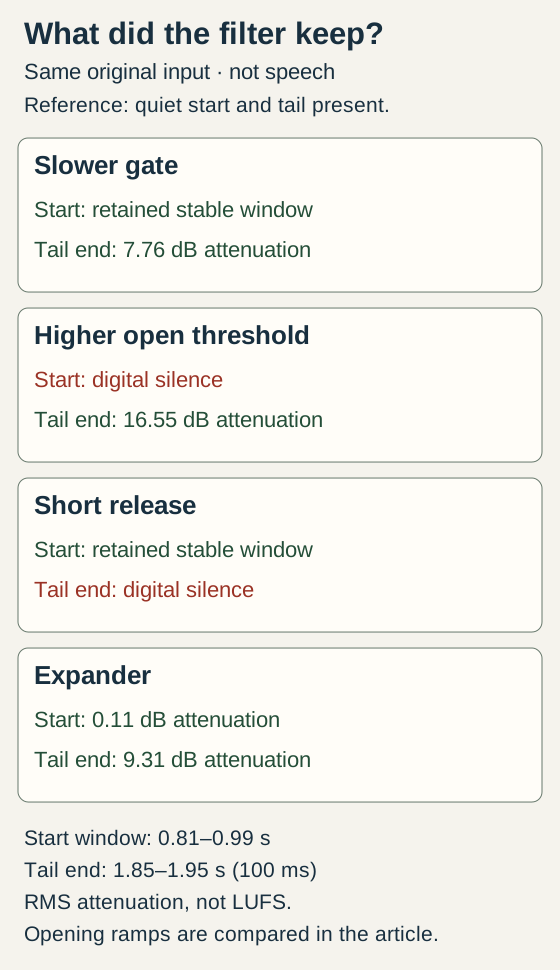
Measured synthetic comparison: a higher opening threshold removes the quiet start; a short release removes the last 100 ms of the tail. Slower gate and expander retain an attenuated tail. This is not speech or a preset recommendation.
Download the WAV files and align them at the same start time in your editor. Inspect 0.81–0.99 s for the quiet start and 1.85–1.95 s for the first tail ending. Keep playback gain the same; the descriptions and diagram provide the comparison without listening.
Reference: quiet start, body and tail
8 seconds. Original synthetic input; no gate or expander. All files use the same input gain.
Download gate-reference.wav · WAV (48 kHz, 16-bit PCM) · 8 seconds · 768,044 bytes
File integrity
SHA-256: 19af749df9a516f08050d2a46314cb37e4eb04beb31e73b0e0364d4d6f69033d
Slower gate example
8 seconds. Open −44 dB, close −50 dB, attack 5 ms, hold 100 ms, release 500 ms. The quiet-start window passes, but the tail remains attenuated.
Download gate-calibrated.wav · WAV (48 kHz, 16-bit PCM) · 8 seconds · 768,044 bytes
File integrity
SHA-256: 9752ffbd735f42d0d5d1710ffac31d060287baee2bb3543dc48a9a6a54a04c4f
Higher opening threshold
8 seconds. Only open threshold changes to −32 dB. The quiet start and separate quiet phrase become digital silence.
Download gate-high-open.wav · WAV (48 kHz, 16-bit PCM) · 8 seconds · 768,044 bytes
File integrity
SHA-256: e9f9ac7fb4a356774a9a9cd8d59296dcb16bb79d3c1e3e02dce16a78d306d8b1
Short release
8 seconds. Only release changes from 500 to 10 ms. The start passes; the final 100 ms of the first tail is digital silence.
Download gate-short-release.wav · WAV (48 kHz, 16-bit PCM) · 8 seconds · 768,044 bytes
File integrity
SHA-256: a77634926908d87dfb28cca7dfbdd5d0640af1f4dd245a13672975e16400944a
Expander comparison
8 seconds. RMS, threshold −48 dB, ratio 2:1, attack 5 ms, release 100 ms, output gain 0 dB. A nonzero tail remains, attenuated by 9.31 dB in its final 100 ms.
Download gate-expander.wav · WAV (48 kHz, 16-bit PCM) · 8 seconds · 768,044 bytes
File integrity
SHA-256: 372c396a4b757d358b8be29d50818e34f8a9f1b66ed75701e4e5d4d6a7f29703
Generated and measured by StudioSignalLab on October 30, 2026. Shipped files are pinned by hash. These examples contain no speech, music or hardware capture. These files use unchanged OBS 33.0.1 processing functions in an offline harness with a stated mono settings adapter, not an installed OBS application, speech or a microphone/room measurement. The signal and gain settings are synthetic examples, not presets for your voice.
Repeat the comparison without mistaking tones for speech
Import the reference and processed files at the same start time in an editor. Inspect 0.81–0.99 seconds for the quiet start, 2.81–3.34 seconds for the quiet phrase and 1.85–1.95 seconds for the end of the first tail. Keep playback gain identical. These selected windows and the diagram make the lesson available without listening to the tones.
The background-only window at 6.80–7.80 seconds becomes digital silence in the three gate files. That benefit does not prove their speech handling is acceptable. The expander instead reduces that window's delivered RMS by about 17.88 dB. Low-level PCM quantization affects such measurements; do not treat this number as a noise-reduction specification for your room.
Our processing output was identical across blocks of 1, 17, 480, 1,024 and 384,000 samples, and we independently decoded the delivered files. Those checks support this reproduction, not a claim that every OBS version, channel layout or host behaves identically. No words, breath sounds, room recording or microphone appear in these files; the next step is the voice test below.
A short acceptance test for your real recording
- Write down the microphone, input gain, distance, filter order, current detector/thresholds/timing and the before filename. Use a copy of the setup, not a live show, for experiments.
- Record three deliveries: normal speech; a quiet phrase starting after a pause; a sentence that ends softly. Include the expected room noise. Keep a bypassed reference with the same input and delivery as closely as practical.
- Change one control. Record again, stop, and compare the actual saved files at the same playback level. Listen for complete starts and endings, a clear quiet phrase, chattering and distracting background returns.
- Accept the change only if the wanted speech survives at normal distance and during realistic movement. Check the mix/track the audience will hear and every relevant scene/source. A clean isolated track does not prove a differently processed mix is clean.
- Keep the result as a bounded note: ‘This threshold/timing retained my quiet phrase and ending in this recording; the fan remained audible in pauses.’ If no setting passes both speech and background checks, fix capture or use less reduction instead of hiding the compromise.
For an existing damaged take, preserve the original and look for a clean separate track or independent backup. A gate cannot reconstruct samples it already removed or remove background that accompanies wanted speech while it is open. If the symptom is two voices, a one-ear file or audio that trails the picture, use the corresponding guide below rather than extending this filter experiment.
Sources and verification
Claims were checked against the following first-party documentation on October 30, 2026. Product capabilities can change; verify current documentation before buying or changing a production system.
- OBS Noise Gate Filter — threshold and timing controls
- OBS Expander Filter — ratio and RMS/Peak detection
- OBS Noise Suppression Filter — intended scope and limits
- OBS 33.0.1 Noise Gate processing source — reproduction reference
- OBS 33.0.1 Expander processing source — reproduction reference
- OBS official download page — version checked October 30, 2026
Frequently asked questions
Why does my OBS noise gate cut off the first word?
The quiet start may not reach the opening threshold, or gain may rise too slowly after opening. Compare a saved recording with the gate bypassed, then test the open threshold and attack separately. Longer release cannot admit a phrase that never opens the gate.
Should close threshold be lower than open threshold in OBS?
Keep the close threshold lower than the open threshold. A more negative dB value is lower. Place both using the actual room and wanted quiet voice, rather than copying another microphone’s numbers.
Will an expander stop OBS from cutting off words?
It can make gain reduction less abrupt, but it still reduces quiet material. Compare a recorded quiet start and ending against a bypassed reference. Our synthetic example retains a nonzero tail with the expander, yet that tail is still attenuated.
What are the best OBS noise gate settings for a quiet voice?
There is no shared preset that can account for every voice, room and gain setting. Establish the room range and your quiet delivery, then adjust thresholds and timing one at a time. If wanted speech overlaps the noise level, improve capture or accept more background rather than forcing silence.
Can I restore words cut off by a noise gate?
Keep the original and check for an unprocessed track or separate backup. Once the wanted samples have been removed from the only recording, lowering a threshold later does not bring them back. Repair cannot be guaranteed.