Tutorial · Research edition
Audio Crackling or Popping? Separate Clipping, Gaps, and Edit Clicks
Compare six original WAV examples to distinguish clipping, interruptions and edit clicks. Trace the fault through source, playback and export before fixing it.
For air bursts on spoken p or b sounds, use Podcast Microphone Technique. This guide covers clipping, interruptions and edit clicks.
A recording crackles on loud words, a short pop appears at every edit, or playback breaks up even though the saved file seems clean. Those observations call for different investigations. Preserve the original and establish where the defect first appears before applying a cleanup effect or changing the recording setup.
Our six downloadable WAV examples make three mechanisms visible: a signal clamped below full scale, a short zero-filled interruption and an abrupt splice. They are controlled teaching examples, not a way to identify a faulty driver by ear. The useful question is whether the evidence points to the source, a project edit, an export or the current playback path.
First, find whether the fault follows the file
- Keep an untouched source and make a working copy. Note two or three event times, whether each event repeats in the same place and which application, output device and processing were active. Do not repeatedly record over the only take.
- Play that same source passage in a second player, then another known working output path if available. Start at a low comfortable volume. A repeated defect at the same file position supports investigating stored content; it does not by itself prove the original recording device caused it.
- Compare the untouched source with the editing project. If the source is clean but a project seam clicks, inspect that edit and its processing first. Bypass one suspect effect on a duplicate, rather than removing every setting at once.
- Export a short identified passage and reopen it outside the project. If the source and export are clean on another playback path, investigate the current monitoring or playback environment. A clean offline export is useful evidence, not a complete test of every live recording condition.
Three problems that can sound similar
Clipping changes sample values when a signal exceeds a limit somewhere in the chain. The result can be sustained harshness or distortion around peaks, rather than an isolated tick. The Audacity manual associates loud-passage distortion and flattened extremes with overload. Check the level at the stage where it happens; a quiet master meter cannot clear every earlier stage.
An interruption can leave a short gap, a repeated fragment or a discontinuity. Our example replaces a known interval with zeros without removing time. Real recording failures need their own evidence: logs, repeatable tests and the actual affected file. A gap with a sharp edge does not establish whether a buffer, connection, edit or other process created it.
An edit click can arise when two otherwise usable pieces meet with an abrupt change. Audacity documents edit-point choice and DC offset as possible causes, and notes that stereo channels need care because their zero crossings may not coincide. A zero-crossing edit is a useful technique in suitable material, not a guarantee for every stereo splice.
Our measured example: six files, three mechanisms
All six files contain 384,000 mono sample frames at 48 kHz: exactly 8 seconds of 16-bit PCM and 768,044 bytes each. The reference combines 220 Hz and 660 Hz synthetic tones, with a 50 ms half-cosine envelope at each outer edge. It contains no speech, music or hardware capture. Generation uses explicit nearest-even integer rounding and no added dither or normalization.
The reference peaks at approximately −23.01 dBFS. For the clipped version we multiply the delivered reference integers by four, then clamp them to ±3,276. That representable ceiling is approximately −20.002 dBFS, intentionally well below digital full scale. Exactly 340,069 samples equal either ceiling, about 88.56% of the file; 340,067 were actually clamped and two already equalled the limit. This is an exaggerated hard-clipping demonstration, not a typical microphone waveform or a model of every overload.
The attenuated version is the delivered clipped PCM divided by two. Every input integer is even, so halving is exact for this fixture. Its peak is approximately −26.02 dBFS. The independent decoder verifies that sample relationship throughout the file. It is quieter, but we have not reconstructed the unclipped reference. None of the six files reaches full scale; that fact clearly does not make the deliberately clamped example clean.
The interruption example replaces exactly 1,440 frames, from 3.500 to 3.530 seconds, with zeros. Samples outside that interval remain identical to the reference and the duration stays 8 seconds. The leading boundary changes by 141 integer units, equal to the reference step there; the return changes by 2,224 units compared with 39 in the reference. The beginning is at a zero crossing, so these are not two equal clicks. The flat interval illustrates a zero-filled gap; it neither simulates an entire driver nor proves what a real capture system would store when it fails.
At 4 seconds, the hard-edit example switches between the reference branch and a branch with its underlying phase shifted by one quarter cycle. The sample step at the join is 1,779 integer units. The comparison blends those same branches over 480 frames, or 10 ms, centered on that join. In the defined local comparison window, the largest adjacent-sample step falls from 1,779 to 139 units. The 220 Hz branch shifts by a quarter cycle and its 660 Hz harmonic by three quarters of a cycle. The linear overlap also changes local level: its 10 ms RMS is approximately −26.89 dBFS versus −25.10 dBFS for the hard-edit window. It is not an equal-power blend. That is a measured continuity comparison, not a perceptual score or proof that every edit needs a 10 ms crossfade.
Both edit files keep the same duration. The crossfade changes only the overlap region; outside it, the delivered samples match the hard-edit file. It creates a smoother transition between available branches and does not reconstruct missing material. A separate decoder checked the RIFF chunks, frame counts, levels and exact comparisons; repeated generation is checked against the delivered file hashes.
Original synthetic demonstration
Compare clipping, an interruption and an edit
Turn playback volume down first. Synthetic tones, no speech or music. All sample peaks at or below −20.002 dBFS. Do not turn up the intentionally silent gap. Listening is optional.
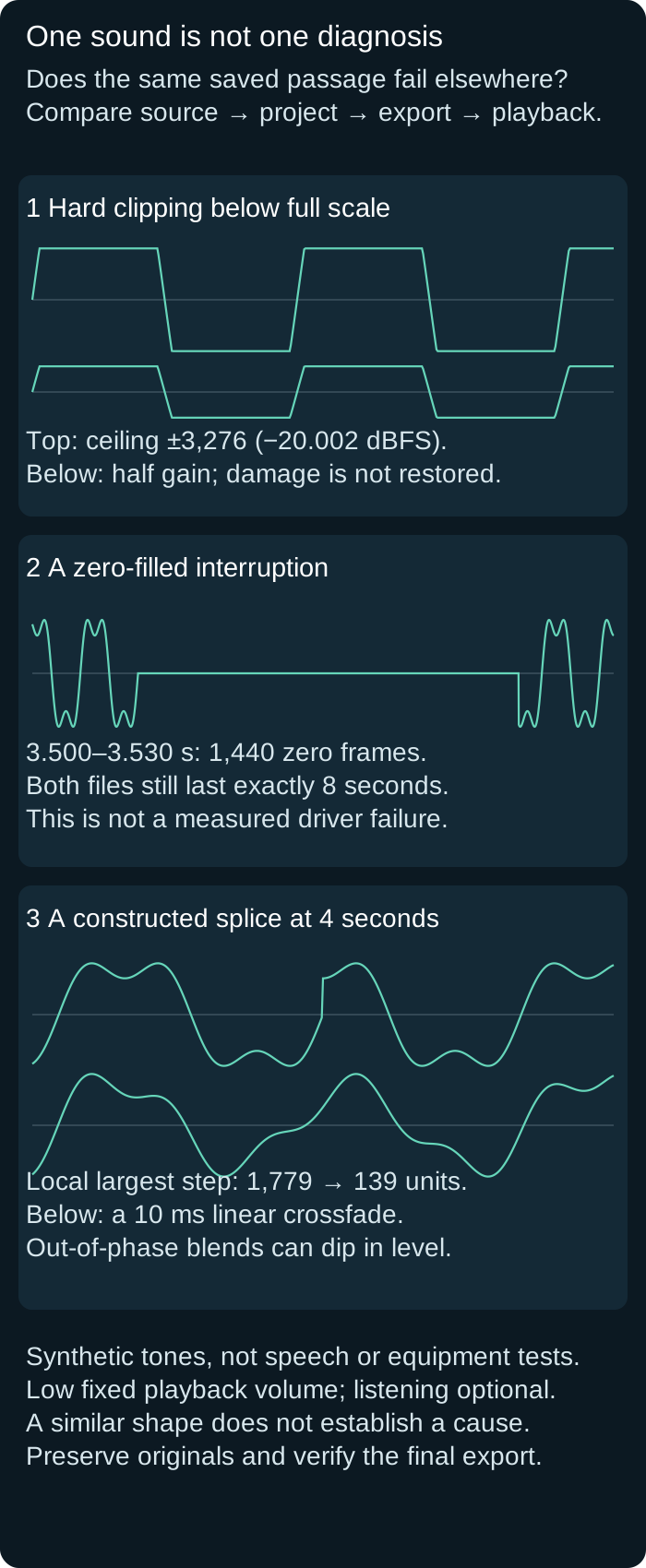
Original synthetic comparisons: severe hard clipping below full scale remains damaged after half gain; a 30 millisecond zero-filled interruption preserves an eight-second duration; a constructed 10 millisecond crossfade reduces the measured local maximum step from 1,779 to 139 integer units. Out-of-phase branches can dip in level; these are not device tests.
Compare the same event at fixed low volume. File 3 is intentionally quieter than file 2; this shows attenuation, not a level-matched quality test. Inspect 3.500–3.530 seconds for the gap and 4 seconds for the edit. Similarity to these fixtures does not identify a hardware cause.
1. Reference: unmodified synthetic source
8 seconds; reference peak −23.01 dBFS. No speech or hardware recording.
Download crackle-reference.wav · WAV (48 kHz, 16-bit PCM; mono) · 8 seconds · 768,044 bytes
File integrity
SHA-256: 54a0e0d5dc8cc9c4dff8ab1141739def86c4543d7cdb97d531cec337a178253e
2. Deliberately severe hard clipping
8 seconds; four-times gain clamped to ±3,276. About 88.56% of samples at the ceiling; peak −20.002 dBFS.
Download crackle-clipped.wav · WAV (48 kHz, 16-bit PCM; mono) · 8 seconds · 768,044 bytes
File integrity
SHA-256: facc888b7cd9a080deef480d11308bc7b55fd44e39f08cc72ac03a3e10ac886b
3. The same clipped signal at half gain
8 seconds; exact sample-by-sample halving of file 2. Peak −26.02 dBFS; original information is not restored.
Download crackle-clipped-attenuated.wav · WAV (48 kHz, 16-bit PCM; mono) · 8 seconds · 768,044 bytes
File integrity
SHA-256: f4f8eae6ec36be523f954f21a5966c922a0c1e3821f1069c788168c3d1ccced6
4. A zero-filled synthetic interruption
8 seconds; exactly 30 ms replaced by zeros from 3.500 to 3.530 seconds. Duration is unchanged. Not a real driver failure.
Download crackle-gap.wav · WAV (48 kHz, 16-bit PCM; mono) · 8 seconds · 768,044 bytes
File integrity
SHA-256: 219af2ff64be9563d9a783af97d7190ab1a820d1ee3280183fc9d5d8fa0c4745
5. An abrupt constructed edit
8 seconds; a phase-shifted branch starts at 4 seconds. Measured join step 1,779 integer units.
Download crackle-hard-edit.wav · WAV (48 kHz, 16-bit PCM; mono) · 8 seconds · 768,044 bytes
File integrity
SHA-256: 5309c9f5f7084bb45a975ea4f79a13779f43f35bb4086a024f2fa89e1694545f
6. The same branches with a short crossfade
8 seconds; a 10 ms linear overlap centered on 4 seconds reduces the local maximum step to 139 units and changes local level. Not a universal repair preset.
Download crackle-crossfade.wav · WAV (48 kHz, 16-bit PCM; mono) · 8 seconds · 768,044 bytes
File integrity
SHA-256: 71d1367a401634ef3a01746b49140a09cecfdb2944854e64944d8eba0fc8a187
Generated and measured by StudioSignalLab on October 31, 2026. Shipped files are pinned by hash. These examples contain no speech, music or hardware capture. Original deterministic PCM arithmetic with explicit nearest-even rounding and two independent decoders. Construction was fixed after exploratory generation, then final files regenerated twice and matched by hash; no blind preregistration claimed. Not an installed application, driver, microphone or interface test.
Compare the examples without chasing loudness
Read the diagram and measurements first; listening is optional. If you listen, use a low fixed device volume and compare the same passage. The clipped and attenuated pair deliberately differs in level to demonstrate why reducing gain is not restoration. It is not a level-matched sound-quality contest. Do not turn the gap up to look for missing content.
For the edit pair, align the files at the same start and inspect a small region around 4 seconds. Zooming out can hide a one-sample transition inside an otherwise normal-looking envelope. Use the known construction and sample measurements as evidence for these fixtures; resemblance to them cannot identify the cause of an unrelated recording problem.
When overload is in the saved source
- Listen and inspect the untouched source, especially the loud passages. Check recording-stage indicators and any processing that ran before the saved signal. Absence of a full-scale warning in the current editor does not exclude clipping earlier in the chain.
- For a repeatable new recording, reduce gain at the stage that overloads and repeat the same loud passage. Turning down a later output can make monitoring quieter while leaving the captured distortion unchanged. Keep the microphone technique and passage comparable.
- For an existing take, preserve the source and test any repair on a duplicate. Choose a trustworthy backup or a re-record when required words are missing or unintelligible. A repair result must be auditioned against the original; a lower meter reading is not a recovery test.
When the click begins at an edit
- Keep the unedited clips and undo history. Locate the exact seam, inspect both channels and check whether the click is absent in the original source.
- Try a more suitable edit point or a short fade or crossfade on a duplicate. Choose the transition for that material: too long can smear timing, while too short may leave an abrupt change. Listen to the words and room transition, not just the spike.
- Reopen the rendered passage and check the seam in context. Audacity’s manual crossfade operation can discard hidden clip data at the junction; preserve the originals before applying it. Our numerical crossfade is an illustration, not an installed Audacity effect test.
When only current playback or recording breaks up
Focusrite’s Windows troubleshooting guide, updated June 11, 2026, recommends investigating buffer size and USB connectivity among several possible causes. For a supported Focusrite Windows setup, use its current device instructions and test one reversible change at a time. There is no single buffer value this article establishes as correct for every computer, interface or application.
Record the setting before changing it, repeat the same workload and compare a saved short test. Follow the manufacturer’s connection specification when checking a port or cable. Improvement after a change is useful for narrowing the case; one clean playthrough does not prove a permanent fix or identify the sole cause.
This guide does not prescribe disabling security protections, reinstalling everything or buying an interface because of one sound. Keep any application log from the affected session and use the vendor’s support path when the fault remains repeatable. A clean file with a problematic playback route and a damaged saved take require different next steps.
Why a click-removal effect is not the first diagnosis
Audacity’s manual describes Click Removal as an attempted repair with detection and width controls; inappropriate settings can affect wanted audio, and the effect does not remove all clicks. A source overload, a missing passage and a bad seam are not interchangeable problems. Preserve a before/after excerpt and judge the intended words and transients as well as the unwanted sound.
A fade can reduce the edge of a gap while leaving the gap itself. That can be acceptable for a transparent edit in suitable material, but it cannot restore the missing information. Do not generate a plausible replacement word and treat it as evidence of what the speaker said. For broader rescue decisions, use the existing AI-cleanup limitations guide.
Keep a repeatable fault-and-fix worksheet
- Source: filename and checksum, event times, recording format and whether the defect repeats in an independent playback path. Record unknown fields as unknown.
- Project: original clips, edit positions, processing, monitored output and the earliest stage where the fault appears. Keep a copy before each test.
- Change: one variable, its before/after value, exact comparison passage and whether the test was live recording, live playback or an offline export. These are different workloads.
- Acceptance: reopen the final file, compare the same event and surrounding speech or transients, confirm intended duration and channel layout, and retain the source and a usable backup. Report remaining uncertainty instead of calling one successful pass a universal cure.
Sources and verification
Claims were checked against the following first-party documentation on October 31, 2026. Product capabilities can change; verify current documentation before buying or changing a production system.
Frequently asked questions
Why is my audio crackling even though it is not reaching 0 dBFS?
The current peak does not describe every earlier stage. Our deliberately clipped file peaks near −20 dBFS and remains clamped after attenuation. Playback interruptions and edit discontinuities also need investigation; a meter alone cannot diagnose the cause.
Will increasing buffer size fix every click or pop?
No. It can be a useful vendor-scoped test for live glitches, but it will not restore a damaged saved source or correct every edit seam. Compare the same file independently before changing the playback setup.
Can lowering the volume repair clipped audio?
It lowers the delivered level but does not by itself restore the original samples. Our clipped and attenuated files demonstrate that exact relationship.
Why do I hear a pop after cutting audio?
An abrupt join, edit-point choice or DC offset can be involved. Check the unedited source, both channels and a reversible transition before applying a broad cleanup effect.
Does a crossfade recover a dropout?
It can smooth a transition using available material, but it cannot prove or restore what was missing. Preserve the source and use a backup or re-record when required content is lost.