Tutorial · Research edition
Audio Plays Too Fast or Too Slow? Check the Sample Rate
Compare four original WAV examples to separate sample-rate interpretation from conversion. Check duration, pitch and export before changing a recording.
A recording sounds unusually high and fast, or low and slow. Before converting it, establish whether the saved file is wrong, the player is running at a different speed, or the project changed its timing. Keep the original untouched. A sample-rate interpretation error is one possible explanation, not a diagnosis you can make from the sound alone.
Our four downloadable WAV files show a useful distinction: relabelling a sample sequence changes how long it lasts, while a proper conversion can change the number of samples and keep the same timing and pitch. Use the measured reference to understand that distinction, then test your own file against evidence of its intended duration.
Find where the speed first changes
- Duplicate the source file and preserve the original recording settings or session notes. Write down a known event or reference duration; do not assume the file header is the ground truth.
- Play the same source file in a second player with normal playback speed and processing disabled where possible. Compare the same passage and its end point. A different preview speed in one application calls for a player-setting check first.
- Compare the source with the imported clip and project. Check clip stretching, tempo or speed controls and whether they were deliberately changed. A file that plays correctly outside the project needs a project investigation.
- Export a short, clearly identified passage and reopen the exported file independently. Record duration, rate, channel count and the location of at least two recognizable events. This separates an export change from a monitoring impression.
Interpretation and conversion answer different questions
A sample rate describes how many sample frames represent one second. For a fixed number of frames, duration equals frame count divided by the interpreted rate. Calling the same 441,000 frames 44,100 frames per second gives 10 seconds; calling them 48,000 gives 9.1875 seconds. Every event moves on the time axis, and the frequency of each periodic component changes by the same rate ratio.
A proper 44.1-to-48 kHz conversion instead computes a new sequence: 480,000 frames can represent the same 10 seconds at 48 kHz. The samples will differ; keeping duration and pitch does not mean byte-identical audio. Audacity’s development manual explicitly distinguishes its resampling operation from changing a track’s rate interpretation. Adobe’s Audition documentation likewise distinguishes Interpret Sample Rate from conversion. The Audacity development manual was built on September 2, 2026; the Adobe page is dated December 16, 2021. These are source-scoped conceptual distinctions; we have not opened our fixtures in Audacity or verified the menus of an installed current Audacity or Audition version.
A correctly identified 44.1 kHz file can therefore play at the correct speed in a 48 kHz project. Do not try to make every displayed number match by relabelling files. First determine which operation the application actually performs and what timing the source is supposed to have.
Our measured example: one source, four rate outcomes
We generated 10 seconds of mono 16-bit PCM at 44.1 kHz. The reference contains a low-level 1 kHz tone and three smooth 500 Hz marker bursts, each 100 milliseconds long, starting at 1, 5 and 9 seconds. The marker centers are nominally 1.05, 5.05 and 9.05 seconds. Short fades avoid abrupt outer edges. These are synthetic tones, not speech, music or a device recording. Two downloadable files are deliberately mislabelled teaching fixtures; they are not correctly labelled source recordings.
Reference: 441,000 frames at 44,100 Hz last exactly 10 seconds. The separate decoder measured the stable reference tone at approximately 1,000.00 Hz.
Faster interpretation: the PCM data is byte-for-byte the same as the reference, but the header declares 48,000 Hz. The file lasts 9.1875 seconds and its measured tone is approximately 1,088.44 Hz. The marker centers move to approximately 0.9647, 4.6397 and 8.3147 seconds. No samples were removed to make this example faster.
Actual conversion: FFmpeg 5.1.2 with its libsoxr resampler converts the original to 480,000 frames at 48 kHz. The file still lasts exactly 10 seconds, the measured reference tone remains 1,000.00 Hz and the marker centers remain 1.05, 5.05 and 9.05 seconds within our 2 ms measurement tolerance. This is a measured result for this command and fixture, not a comparison of application or resampler quality.
Slower interpretation: the converted 48 kHz PCM data is left unchanged but declared as 44,100 Hz. It lasts approximately 10.8844 seconds; the measured tone is 918.75 Hz. Its marker centers are approximately 1.1428, 5.4965 and 9.8503 seconds. The opposite directions have different duration ratios, so the percentage changes are not symmetric.
Both interpretation changes shift pitch by about 1.467 semitones in magnitude, in opposite directions. We derived the expected ratios before measuring and independently decoded the delivered RIFF chunks. Frequency was measured from interpolated positive crossings in a stable region corresponding to source seconds 2–4, away from marker bursts. We located marker envelopes separately.
The source uses explicit nearest-even PCM rounding. The conversion produces floating-point samples followed by the same explicit rounding to 16-bit PCM, with no added dither or normalization. Repeating generation produced identical delivered bytes. Every file has zero clipped samples and a measured peak below −25.4 dBFS. The 1 kHz component changed by less than 0.001 dB in the converted fixture; this single low-frequency result says nothing about every frequency or the best converter.
Original synthetic demonstration
Compare interpretation with actual conversion
Turn playback volume down first. Synthetic tones; no speech, music or hardware capture. All measured peaks below −25.4 dBFS. Files 2 and 4 are deliberately mislabelled teaching fixtures. Listening is optional.
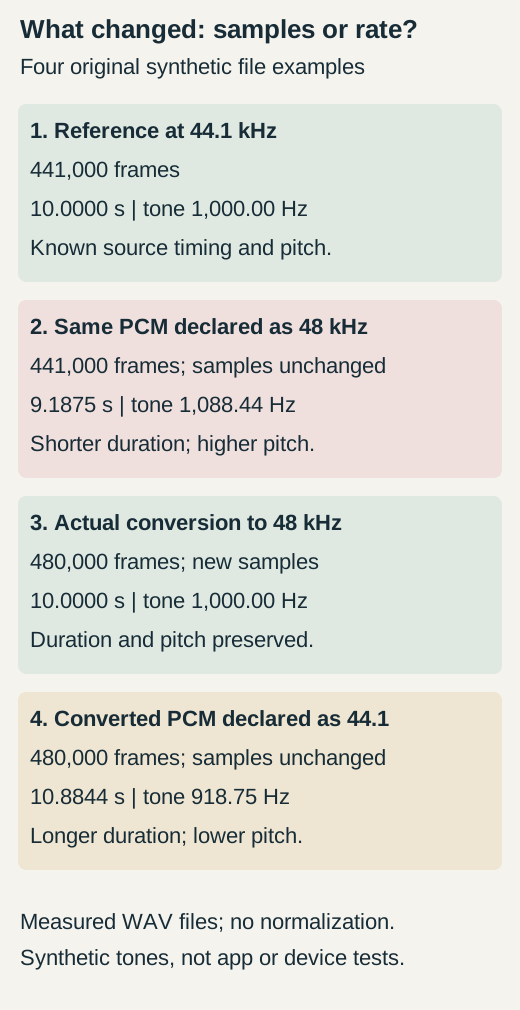
Four measured synthetic WAV outcomes: a ten-second 44.1 kHz reference, the same frames declared as 48 kHz lasting 9.1875 seconds, a proper 48 kHz conversion retaining ten seconds, and its frames declared as 44.1 kHz lasting about 10.8844 seconds.
Compare duration, tone frequency and timing markers at a fixed low volume. Open files separately and check automatic conversion or stretching. Players may convert audio for playback; use the measured frame counts and marker times as evidence.
1. Reference: correctly labelled 44.1 kHz
10 seconds; 441,000 frames. Measured tone: 1,000.00 Hz. Marker centers near 1.05, 5.05 and 9.05 s.
Download rate-reference-44100.wav · WAV (44.1 kHz, 16-bit PCM; mono) · 10 seconds · 882,044 bytes
File integrity
SHA-256: 3b0ee822e06135f1ab14f407d515a3aadd4652c23befdae7198bc6f3381ca5b5
2. Deliberately mislabelled: reference declared as 48 kHz
9.1875 seconds; same 441,000 PCM frames as file 1. Measured tone: 1,088.44 Hz. This is an intentional test fixture, not a correctly labelled recording.
Download rate-interpreted-48000.wav · WAV (48 kHz, 16-bit PCM; mono) · 9.1875 seconds · 882,044 bytes
File integrity
SHA-256: f4615ee27a253982af7a6022a1168d1f2a85d27e3f07a4445be2c13e35be61bd
3. Proper conversion: 48 kHz
10 seconds; 480,000 newly computed frames. Measured tone: 1,000.00 Hz. Marker centers remain near 1.05, 5.05 and 9.05 s.
Download rate-resampled-48000.wav · WAV (48 kHz, 16-bit PCM; mono) · 10 seconds · 960,044 bytes
File integrity
SHA-256: 06c56766645c84fa6bd0de0fc9fa3e386ad726717e90a60a5a82638794cade1b
4. Deliberately mislabelled: conversion declared as 44.1 kHz
Approximately 10.8844 seconds; same 480,000 PCM frames as file 3. Measured tone: 918.75 Hz. This is an intentional test fixture, not a correctly labelled recording.
Download rate-interpreted-44100.wav · WAV (44.1 kHz, 16-bit PCM; mono) · 10.8844 seconds · 960,044 bytes
File integrity
SHA-256: 3d1e791fce796b8ae7e3becccfe1cd9cf7e0d4888a5e0954514d2fbc51a9efc6
Generated and measured by StudioSignalLab on October 31, 2026. Shipped files are pinned by hash. These examples contain no speech, music or hardware capture. Original synthetic file experiment. Actual FFmpeg 5.1.2/libsoxr conversion at floating-point precision, then explicit nearest-even 16-bit rounding; no added dither or normalization. Not an installed Audacity, Adobe, OBS or hardware test.
Read the comparison before listening
Use the diagram and duration labels if you prefer not to play tones. For an optional listening comparison, keep volume low and fixed. Open each file separately so the editor can respect its declared rate. If you place them together, note any automatic conversion or clip stretching; otherwise the application may hide the very difference you are trying to inspect.
Browsers and applications may convert audio for playback, so listening is optional; use the decoded frame counts, declared rates and marker times as the evidence for these files. The reference and properly converted files should have the same event timing. The two interpretation files have compressed or expanded spacing between events. Compare the listed marker centers, not waveform appearance alone. The 500 Hz bursts are timing references, not a spoken-word intelligibility test.
Use the ratio as a clue, then test alternatives
For a known source rate, speed ratio equals interpreted rate divided by source rate. Duration uses the inverse ratio. A 44.1 kHz sequence interpreted at 48 kHz runs about 8.84% faster; a 48 kHz sequence interpreted at 44.1 kHz runs about 8.125% slower. Test that hypothesis against both duration and a reliable reference tone or known event. A header value alone cannot reveal the intended capture rate. For a pure interpretation error, pitch ratio and duration ratio are reciprocals and event spacing changes by one constant factor. Unchanged pitch with changed duration, pitch change without the expected duration change, or a ratio that varies across the take refutes that simple explanation as the sole cause. A growing event-time difference alone does not refute it: even one constant speed ratio accumulates a larger offset over time.
A playback-speed control can change what you hear without changing the saved source. Time-stretch processing may change duration while preserving pitch. If your voice has its familiar pitch but the clip is shorter, that is a different clue from our rate-only examples, although it still does not establish the cause. Audacity’s current pitch-and-tempo reference describes those operations separately.
A fixed sound-versus-picture offset is not this uniform speed change. Small drift over a long take can have other clock or capture causes; the large 44.1/48 ratios are not a general remedy for it. Use the existing audiovisual-sync guide when comparing sound with picture. Missing chunks, repeated sections or discontinuities also need a different investigation; do not stretch a damaged file merely to force its end to line up.
Keep a source, project and export worksheet
- Source: record the filename and checksum, declared sample rate, frame count, calculated duration and the independent evidence for its intended timing. If the actual capture rate is unknown, say unknown.
- Project: record the application/version, project rate, clip speed or stretch setting, any automatic conversion and the times of two or three known events. Change one setting on a copy at a time.
- Export: record the chosen rate and format, reopen the result in a second player and compare the same events. State whether the difference begins at import, playback, processing or export.
- Correction: document the reason for the chosen operation and retain the before/after files. “The number now says 48 kHz” is not an acceptance result.
Choose the correction from the evidence
If only preview playback is altered, return that preview to normal and recheck the unchanged source. If a clip was intentionally or accidentally stretched, review that project setting. Neither situation by itself calls for reinterpretation of the original file.
If the source is correctly identified and the destination requires another rate, use an actual sample-rate conversion and verify the result. Our converted file demonstrates the expected time-and-pitch outcome. A valid conversion does not become a speed fault merely because the project and source use different rates.
If independent capture notes or a known-duration reference establish that a header is wrong, test a rate-interpretation correction on a duplicate with a tool that documents that operation. Check the whole passage, event spacing and pitch against the reference before saving a corrected copy. Do not hex-edit the only recording or choose whichever interpretation sounds more flattering.
When there is no reliable reference, preserve uncertainty. An editor can make a file longer, shorter, higher or lower without proving which version is authentic. Return to the recorder, session settings or a trustworthy backup where possible. Resampling a file whose current interpretation is already wrong can preserve that wrong timing, so it is not a substitute for establishing the source timebase.
Accept the result after reopening the final file
- Confirm the intended duration and at least two separated events against independent reference evidence. Compare the same content, not an approximate recollection.
- Confirm expected pitch using a known reference where available, then listen at a comfortable fixed level. Our synthetic tone measurements are not a shortcut for judging an unknown voice.
- Reopen the final export outside the editing project and verify the required rate, channel count and format. Delivery loudness is a separate check covered by the export-settings guide.
- Retain the original, the justified correction, settings, hashes and a matched before/after passage. Report exactly what passed and what remains unknown.
Sources and verification
Claims were checked against the following first-party documentation on October 31, 2026. Product capabilities can change; verify current documentation before buying or changing a production system.
Frequently asked questions
Does converting 44.1 kHz to 48 kHz change pitch?
A proper sample-rate conversion can preserve duration and pitch while computing new samples. Reinterpreting the same samples as a different rate changes both. Our reference and converted WAVs demonstrate the distinction for a known synthetic signal.
Why does my audio play faster and sound higher?
A sample-rate interpretation error is one possibility. Check normal player speed, the same file in another player, project stretch settings and independently known timing before modifying a copy.
Should every file and project use the same sample rate?
Different valid rates can work correctly when the application performs conversion. Matching the displayed numbers by relabelling a source is not equivalent to converting it.
Will changing bit depth or MP3 bit rate fix the speed?
These describe different properties from the sample timebase. First identify where duration or playback speed changes; do not treat a bit-depth or bit-rate adjustment as evidence that the source rate was wrong.
Can I recover the correct speed without knowing the original rate?
You can try reversible comparisons, but a rate ratio or a familiar sound does not prove the intended timing. Seek capture settings, a trustworthy reference duration, a reference tone or a backup before claiming a correction.