Troubleshooting · Research edition
OBS Audio Out of Sync: Measure Delay Before Changing Settings
Measure whether OBS audio is early, late or drifting. Use our original flash-and-tone files, frame-to-millisecond examples and source-by-source retest.
If the clap lands in one place and its sound lands somewhere else, first find out whether the gap stays the same. A delay setting can solve a steady mismatch. It cannot describe a gap that keeps changing.
This guide starts with the saved recording. You will measure a few visible events, identify the earlier signal and change one route. The synthetic examples below show what a known offset looks like; they do not tell you the delay of your camera or microphone.
Original synthetic demonstration
Practise measuring a known offset
Turn playback volume down first. Flash warning: each video has one small white flash every two seconds. Synthetic tone bursts; no OBS recording. Download for timeline measurement; not a device-calibration test.
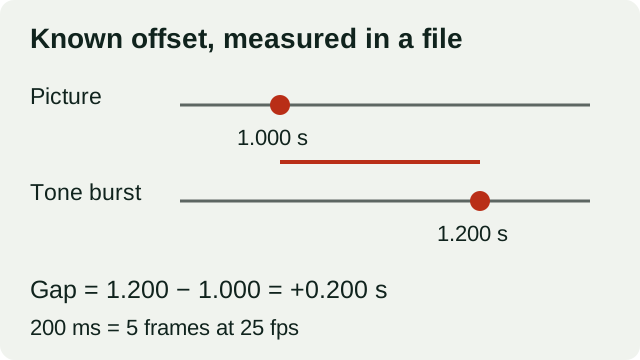
Known-offset example: a picture event at 1.000 seconds and its tone at 1.200 seconds give a positive 200 ms gap, equal to five frames at 25 fps.
Download the files, import them into an editor that shows video frames and audio waveforms, and compare the event positions on its timeline. These files illustrate a known offset; they do not calibrate your camera, microphone or playback chain.
Reference: nominally aligned
6 seconds, 25 fps. Flashes at 1, 3 and 5 seconds, nominally aligned with 60 ms tone bursts. Decoded onset gap approximately 1.17 ms using our threshold.
Download sync-0ms.mp4 · MP4 (H.264/AAC) · 6 seconds · 27,330 bytes
File integrity
SHA-256: fd159fd1507ef1a026d4ea319724357127393be375d73d26b9367dc00254b99e
Comparison: audio 200 ms late
6 seconds, 25 fps. The same flashes; each tone burst starts nominally 200 ms later. Decoded onset gap approximately 201.17 ms.
Download sync-200ms.mp4 · MP4 (H.264/AAC) · 6 seconds · 26,653 bytes
File integrity
SHA-256: 78aa511a7f2486a66ec73502cf8409c3266c1d1b0fb62d06637890bb924ed3ea
Unencoded audio and caption-text downloads
The WAV files contain the tone bursts without AAC encoding. The VTT files describe the flash times and intended offsets for a compatible player you already use.
Unencoded timing audio
Tone bursts nominally aligned with the flashes at 1, 3 and 5 seconds.
Download sync-0ms.wav · WAV (48 kHz, 16-bit PCM) · 6 seconds · 576,044 bytes
File integrity
SHA-256: dbc82dc5a471e4302abcda2f45d3d0fa974d37198e53edef402e05932957e5cb
Unencoded timing audio
Tone bursts nominally 200 ms after the flashes at 1, 3 and 5 seconds.
Download sync-200ms.wav · WAV (48 kHz, 16-bit PCM) · 6 seconds · 576,044 bytes
File integrity
SHA-256: d00de685dc888cb280f3bd8196caa7c40a9f19a8ae6a289621a8d471cf2532a5
Caption text for a compatible player
Downloadable caption text for a player you already use; the page does not display a caption track. The described clip lasts 6 seconds.
Download sync-0ms.vtt · VTT caption text · 6 seconds · 165 bytes
File integrity
SHA-256: 50504e2f328a19bd7297811703227bb5c1965e913ce8967b84e9f86fca8c2d53
Caption text for a compatible player
Downloadable caption text for a player you already use; the page does not display a caption track. The described clip lasts 6 seconds.
Download sync-200ms.vtt · VTT caption text · 6 seconds · 170 bytes
File integrity
SHA-256: c154c8b424a49470bc8b5a140442c2ba80ced02174bae77bad3a5a81f3774aad
Generated and measured by StudioSignalLab on October 29, 2026. Shipped files are pinned by hash. Measurements can be repeated; different encoders, fonts or builds may produce different bytes. These examples contain no speech, music or hardware capture.
Start with an event you can identify twice
Use a visible clap or another sharp event you can record appropriately. In the saved file, find the first frame where contact is visible and the start of the matching sound. Listening is useful, but placing both events on a timeline makes the direction of the error less ambiguous.
Choose an event whose picture is clear. A blurred hand movement and a rounded sound onset leave more room for judgement than the clean pulses in our generated files. State the frame rate and how you selected the audio onset; do not report millisecond precision from a vague visual cue.
Make the same observation near the beginning, middle and end of a representative recording. The point is not that three observations prove reliability. They can reveal that the problem you were about to treat as one fixed delay is changing.
Give the gap a sign before opening the controls
Use this measurement convention: gap = audio-event time minus picture-event time. A positive result means the sound arrives later in the file. A negative result means it arrives earlier. This convention belongs to our worksheet, not to the sign or limits of an OBS control.
- Invented timeline example: Picture 1.000 s; sound 1.200 s; Measured gap: +200 ms; What it tells you: Audio is later; picture is earlier
- Invented timeline example: Picture 1.000 s; sound 0.800 s; Measured gap: −200 ms; What it tells you: Audio is earlier; picture is later
- Invented timeline example: Picture 1.000 s; sound 1.000 s; Measured gap: 0 ms at chosen resolution; What it tells you: No measured gap at this event
Convert frames without pretending every recording is 25 fps
For a constant-frame-rate timeline, milliseconds = frame difference ×1000 ÷ actual frames per second. Five frames at 25 fps are 200 ms; five at 30 fps are about 166.7 ms. Use the actual timeline rate, including a fractional rate when relevant.
Frame counting limits the precision of the picture observation. At 25 fps one frame spans 40 ms, so a one-frame judgement error matters. If the editor and source use different timing assumptions, resolve that before choosing a correction.
- Actual fps: 25; One frame: 40.0 ms; Five frames: 200.0 ms
- Actual fps: 30; One frame: 33.3 ms; Five frames: 166.7 ms
- Actual fps: 50; One frame: 20.0 ms; Five frames: 100.0 ms
- Actual fps: 60; One frame: 16.7 ms; Five frames: 83.3 ms
Choose the branch that matches the evidence
The following scenarios are invented diagnostic examples. They are not observations from an OBS session. More than one cause can produce the same symptom, so keep the original recording and change one variable at a time.
- Beginning / middle / end, or symptom: +200,+200,+200 ms; Working interpretation: A repeatable fixed mismatch; Next useful test: Test one source delay, then measure a fresh file
- Beginning / middle / end, or symptom: +40,+200,+360 ms; Working interpretation: Gap changes across the recording; Next useful test: Investigate timing stability and the capture chain; one offset is insufficient
- Beginning / middle / end, or symptom: Same file agrees in one viewer but not another; Working interpretation: Playback or interpretation differs; Next useful test: Compare source/timeline settings and another playback path before changing capture
- Beginning / middle / end, or symptom: Only one camera disagrees with the microphone; Working interpretation: Source-specific path deserves attention; Next useful test: Measure that camera separately; avoid moving every source
Use the appropriate delay control
Focusrite's OBS setup guide identifies Sync Offset in Advanced Audio Properties as a millisecond adjustment and says the required value depends on how the system processes audio and video. OBS separately documents Render Delay as delaying a source image. Those are two different places in the signal path.
We checked the OBS Studio 33.0.0 source: the Advanced Audio Properties dialog creates a Sync Offset field in milliseconds, with a range of −950 to 20,000, and passes the chosen value to the source sync-offset API. That is a version-specific control check, not a measurement of its effect on your recording. Confirm direction with a fresh short recording rather than copying the sign from our worksheet.
If the audio is consistently early, adding delay to that audio is a candidate correction. If the image is consistently early, delaying that image is a candidate. Check which source the control applies to in your installed build; our worksheet's plus or minus sign does not establish a supported input range.
Record the old setting before the change. Apply one small, measured correction to the earlier route and make another file. Recheck the same event positions. A change that makes one clap look right but introduces a different mismatch has not passed the test.
When the gap grows, stop chasing it with one offset
A fixed delay shifts the whole signal by the same amount. It therefore cannot remove a gap that is small at the start and larger at the end. Note the devices, connection paths, recording duration and source/timeline rates, then reproduce the problem with a simpler scene.
Keep the OBS log from the affected session and note any performance warnings you actually observe. Device timing, buffering, performance and an editor's interpretation are investigation areas, not conclusions you can draw from lip sync alone. Matching sample-rate labels does not prove that independent device clocks agree.
Likewise, remuxing a recording is a container handoff, not evidence that its timing has been repaired. Use the separate format/remux guide for that job. Do not overwrite the only recording while trying repairs.
What the original demonstrations establish
We generated six-second files with picture flashes beginning at 1, 3 and 5 seconds. The reference tone bursts are nominally aligned; the comparison bursts are 200 ms late. After H.264/AAC encoding, our decoded centre-pixel and audio-threshold check measured about 1.17 ms and 201.17 ms respectively. The roughly 1.17 ms onset difference belongs to the fade/threshold measurement; it is not measured OBS latency.
The video runs at 25 fps, and the test accepts a 10 ms audio-onset tolerance around the nominal offsets. Use the downloaded files for a timeline check in your editor. Your headphones, display and playback software have their own timing behaviour; these examples do not calibrate that chain.
Neither file demonstrates long-session drift. For that, use your own representative recording and the three-position worksheet above.
FFmpeg 5.1.2 decoded the encoded files. Their AAC first packet starts at −1024 samples (−21.333 ms) with 1024 skip samples and a presentation start of zero. The decoder honours that priming information; we measured the presented audio timeline and did not add 21.333 ms by hand. The audio onset threshold was an absolute sample value above 800/32768 after a 5 ms fade. Different onset choices can change the small residual.
Keep a correction another editor can understand
Save the original filename, source names, actual frame rate, event positions, measured gaps and the single setting changed. Keep the fresh test file beside that record. A useful handoff says which path was corrected and how the saved result was checked, rather than simply saying that sync was fixed.
If the problem remains, that small evidence package is a better support request than a list of settings copied from someone else's machine.
Sources and verification
Claims were checked against the following first-party documentation on October 29, 2026. Product capabilities can change; verify current documentation before buying or changing a production system.
Frequently asked questions
What sync offset should I use in OBS?
There is no universal value. Measure a clear picture/sound event in a saved file, establish which source is early and test the corresponding control on that source. Our measurement sign is not an OBS setting.
Why does sync get worse during a long recording?
A growing gap is different from a constant delay. Investigate the capture and playback chain using observations and logs; the symptom alone does not identify a faulty device or a single cause.
Does remuxing MKV to MP4 fix audio drift?
Remuxing changes the container; it does not establish that timing was repaired. Preserve the original and measure the resulting file rather than assuming a different extension solves sync.
Were the examples recorded in OBS?
No. They are generated flash-and-tone files with known intended timing and independent decoded-file checks. They are not hardware or application benchmarks.